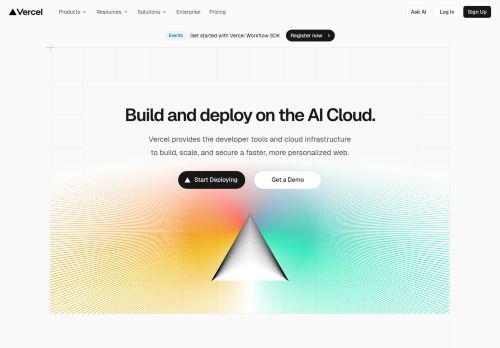
Mobile 375 × 812

Desktop 1440 × 900

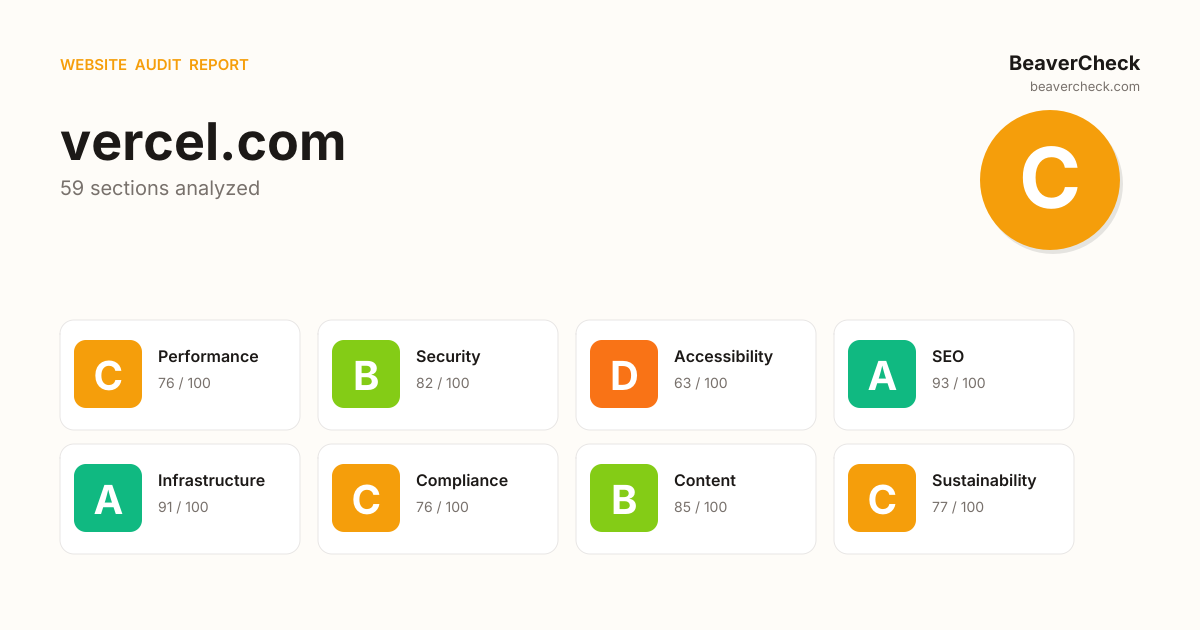
Score: 79 / 100
Based on 8 categories, 0 sections
The overall score is a weighted average of individual category scores. Categories with more impact on user experience and security carry more weight.
Weights reflect general web best practices. Individual needs may differ.
'unsafe-eval' found in script source
'unsafe-inline' found in script source
2 image-only link(s) without alt text
6 link(s) with no accessible text
Soft 404: server returns HTTP 200 for non-existent pages
[](https://beavercheck.com/results/0bb44f3f-e1d7-43cb-bede-1b51842f617e)<a href="https://beavercheck.com/results/0bb44f3f-e1d7-43cb-bede-1b51842f617e"><img src="https://beavercheck.com/badge?url=https%3A%2F%2Fvercel.com" alt="BeaverCheck Score"></a>https://beavercheck.com/badge?url=https%3A%2F%2Fvercel.comThis badge auto-updates with your latest scan result.
Thanks for your feedback!
Industry-standard audits powered by Google Lighthouse.
Key metrics that affect user experience.
First Contentful Paint First Contentful Paint — how long until the browser renders the first piece of content. Under 1.8s is good.
3.15 s
Largest Contentful Paint Largest Contentful Paint — how long until the largest visible element loads. Under 2.5s is good.
15.24 s
Total Blocking Time Total Blocking Time — total time the main thread was blocked, preventing user input. Under 200ms is good.
2.97 s
Cumulative Layout Shift Cumulative Layout Shift — measures visual stability. How much the page layout shifts during loading. Under 0.1 is good.
0.001
Speed Index Speed Index — how quickly content is visually displayed during load. Under 3.4s is good.
6.37 s
Time to Interactive Time to Interactive — how long until the page is fully interactive and responds to user input. Under 3.8s is good.
18.92 s
Audit breakdown by category with detailed findings.
Remove large, duplicate JavaScript modules from bundles to reduce unnecessary bytes consumed by network activity.
Polyfills and transforms enable older browsers to use new JavaScript features. However, many aren't necessary for modern browsers. Consider modifying your JavaScript build process to not transpile Baseline features, unless you know you must support older browsers. Learn why most sites can deploy ES6+ code without transpiling
3rd party code can significantly impact load performance. Reduce and defer loading of 3rd party code to prioritize your page's content.
Your first network request is the most important. Reduce its latency by avoiding redirects, ensuring a fast server response, and enabling text compression.
A forced reflow occurs when JavaScript queries geometric properties (such as offsetWidth) after styles have been invalidated by a change to the DOM state. This can result in poor performance. Learn more about forced reflows and possible mitigations.
Avoid chaining critical requests by reducing the length of chains, reducing the download size of resources, or deferring the download of unnecessary resources to improve page load.
Requests are blocking the page's initial render, which may delay LCP. Deferring or inlining can move these network requests out of the critical path.
These insights are also available in the Chrome DevTools Performance Panel - record a trace to view more detailed information.
The maximum potential First Input Delay that your users could experience is the duration of the longest task. Learn more about the Maximum Potential First Input Delay metric.
Redirects introduce additional delays before the page can be loaded. Learn how to avoid page redirects.
| URL | Time Spent |
|---|---|
| vercel.com/ | 791 ms |
| vercel.com/ | 0.0 ms |
Time to Interactive is the amount of time it takes for the page to become fully interactive. Learn more about the Time to Interactive metric.
Reduce unused rules from stylesheets and defer CSS not used for above-the-fold content to decrease bytes consumed by network activity. Learn how to reduce unused CSS.
| URL | Transfer Size | Est Savings |
|---|---|---|
| /vc-ap-vercel-marketing/_next/static/chunks/0g25vkr3gbhl0... | 48.6 KiB | 47.0 KiB |
| /vc-ap-vercel-marketing/_next/static/chunks/41iv6y1hc_bfr... | 21.0 KiB | 19.8 KiB |
| /vc-ap-vercel-marketing/_next/static/chunks/209g13gf7m3vv... | 20.4 KiB | 18.0 KiB |
| /vc-ap-vercel-marketing/_next/static/chunks/1lnu29x9rj91f... | 20.4 KiB | 14.2 KiB |
Reduce unused JavaScript and defer loading scripts until they are required to decrease bytes consumed by network activity. Learn how to reduce unused JavaScript.
Consider reducing the time spent parsing, compiling, and executing JS. You may find delivering smaller JS payloads helps with this. Learn how to reduce Javascript execution time.
| URL | Total CPU Time | Script Evaluation | Script Parse |
|---|---|---|---|
| /vc-ap-vercel-marketing/_next/static/chunks/0qwp0e1--mion... | 4.2 s | 3.0 s | 35 ms |
| vercel.com/ | 1.8 s | 204 ms | 262 ms |
| Unattributable | 763 ms | 41 ms | 0.0 ms |
| /vc-ap-vercel-marketing/_next/static/chunks/2h7j-ni5sfb1w... | 249 ms | 141 ms | 17 ms |
| /vc-ap-vercel-marketing/_next/static/chunks/3gxg9lo455tw9... | 241 ms | 16 ms | 5.4 ms |
| /vc-ap-vercel-marketing/_next/static/chunks/1tg1onxbcqkht... | 239 ms | 221 ms | 14 ms |
| /vc-ap-vercel-marketing/_next/static/chunks/2m4l2jjb6mt6m... | 163 ms | 3.1 ms | 159 ms |
| /vc-ap-vercel-marketing/_next/static/chunks/3dup2rtv6j0j6... | 84 ms | 2.1 ms | 17 ms |
Consider reducing the time spent parsing, compiling and executing JS. You may find delivering smaller JS payloads helps with this. Learn how to minimize main-thread work
| Category | Time Spent |
|---|---|
| Script Evaluation | 3.9 s |
| Style & Layout | 2.4 s |
| Script Parsing & Compilation | 1.1 s |
| Other | 1.1 s |
| Parse HTML & CSS | 306 ms |
| Rendering | 81 ms |
| Garbage Collection | 35 ms |
More information about the performance of your application. These numbers don't directly affect the Performance score.
These checks highlight opportunities to improve the accessibility of your web app. Automatic detection can only detect a subset of issues and does not guarantee the accessibility of your web app, so manual testing is also encouraged.
Low-contrast text is difficult or impossible for many users to read. Learn how to provide sufficient color contrast.
| Failing Elements |
|---|
'openai/gpt-5.4' pre.relative > code.whitespace-pre-wrap > span.animate > span.px-1 |
41.3% div.flex > div.flex > div.flex > p.text-right |
16.4% div.flex > div.flex > div.flex > p.text-right |
7.7% div.flex > div.flex > div.flex > p.text-right |
5.9% div.flex > div.flex > div.flex > p.text-right |
5.4% div.flex > div.flex > div.flex > p.text-right |
3.1% div.flex > div.flex > div.flex > p.text-right |
3.0% div.flex > div.flex > div.flex > p.text-right |
2.8% div.flex > div.flex > div.flex > p.text-right |
10 div.flex > div.flex > div.flex > p.font-mono |
1.7% div.flex > div.flex > div.flex > p.text-right |
These are opportunities to improve the legibility of your content.
Screen readers have a specific way of announcing lists. Ensuring proper list structure aids screen reader output. Learn more about proper list structure.
| Failing Elements |
|---|
Vercel logo nav > div.grid > div > ul.list-none |
These are opportunities to improve the experience of reading tabular or list data using assistive technology, like a screen reader.
Disabling zooming is problematic for users with low vision who rely on screen magnification to properly see the contents of a web page. Learn more about the viewport meta tag.
| Failing Elements |
|---|
head > meta head > meta |
These items highlight common accessibility best practices.
Errors logged to the console indicate unresolved problems. They can come from network request failures and other browser concerns. Learn more about this errors in console diagnostic audit
| Source | Description |
|---|---|
vercel.com/ line 79, col 5671 | Connecting to 'https://www.vercel-status.com/api/v2/incidents/unresolved.json' violates the following Content Security Policy directive: "connect-src 'self' data: *.chilipiper.com *.ingest.sentry.io *.ingest.us.sentry.io wss://ws-us3.pusher.com sockjs-use3.pusher.com react-tweet.vercel.app https://*.contentful.com vercel.com *.vercel.com assets.vercel.com *.vercel.sh vercel.live wss://*.vercel.com *.codesandbox.io localhost:* chrome-extension://* https://www.youtube-nocookie.com *.chilipiper.com https://risk.clearbit.com https://react-tweet.vercel.app/* cdp.vercel.com". The action has been blocked. |
Failed to load resource: the server responded with a status of 403 () | |
vercel.com/ line 79, col 5671 | Fetch API cannot load https://www.vercel-status.com/api/v2/incidents/unresolved.json. Refused to connect because it violates the document's Content Security Policy. |
Issues logged to the `Issues` panel in Chrome Devtools indicate unresolved problems. They can come from network request failures, insufficient security controls, and other browser concerns. Open up the Issues panel in Chrome DevTools for more details on each issue.
| Issue type |
|---|
| Content security policy |
Source maps translate minified code to the original source code. This helps developers debug in production. In addition, Lighthouse is able to provide further insights. Consider deploying source maps to take advantage of these benefits. Learn more about source maps.
These checks ensure that your page is following basic search engine optimization advice. There are many additional factors Lighthouse does not score here that may affect your search ranking, including performance on Core Web Vitals. Learn more about Google Search Essentials.
Descriptive link text helps search engines understand your content. Learn how to make links more accessible.
| Link destination | Link Text |
|---|---|
| vercel.com/fluid | Learn more |
Format your HTML in a way that enables crawlers to better understand your app’s content.
Industry-standard audits powered by Google Lighthouse. — Desktop
Key metrics that affect user experience. — Desktop
First Contentful Paint First Contentful Paint — how long until the browser renders the first piece of content. Under 1.8s is good.
710 ms
Largest Contentful Paint Largest Contentful Paint — how long until the largest visible element loads. Under 2.5s is good.
1.68 s
Total Blocking Time Total Blocking Time — total time the main thread was blocked, preventing user input. Under 200ms is good.
470 ms
Cumulative Layout Shift Cumulative Layout Shift — measures visual stability. How much the page layout shifts during loading. Under 0.1 is good.
0.000
Speed Index Speed Index — how quickly content is visually displayed during load. Under 3.4s is good.
1.15 s
Time to Interactive Time to Interactive — how long until the page is fully interactive and responds to user input. Under 3.8s is good.
3.87 s
Audit breakdown by category with detailed findings.
Remove large, duplicate JavaScript modules from bundles to reduce unnecessary bytes consumed by network activity.
Polyfills and transforms enable older browsers to use new JavaScript features. However, many aren't necessary for modern browsers. Consider modifying your JavaScript build process to not transpile Baseline features, unless you know you must support older browsers. Learn why most sites can deploy ES6+ code without transpiling
3rd party code can significantly impact load performance. Reduce and defer loading of 3rd party code to prioritize your page's content.
Your first network request is the most important. Reduce its latency by avoiding redirects, ensuring a fast server response, and enabling text compression.
A forced reflow occurs when JavaScript queries geometric properties (such as offsetWidth) after styles have been invalidated by a change to the DOM state. This can result in poor performance. Learn more about forced reflows and possible mitigations.
Avoid chaining critical requests by reducing the length of chains, reducing the download size of resources, or deferring the download of unnecessary resources to improve page load.
Requests are blocking the page's initial render, which may delay LCP. Deferring or inlining can move these network requests out of the critical path.
These insights are also available in the Chrome DevTools Performance Panel - record a trace to view more detailed information.
Redirects introduce additional delays before the page can be loaded. Learn how to avoid page redirects.
| URL | Time Spent |
|---|---|
| vercel.com/ | 223 ms |
| vercel.com/ | 0.0 ms |
The maximum potential First Input Delay that your users could experience is the duration of the longest task. Learn more about the Maximum Potential First Input Delay metric.
Time to Interactive is the amount of time it takes for the page to become fully interactive. Learn more about the Time to Interactive metric.
Reduce unused rules from stylesheets and defer CSS not used for above-the-fold content to decrease bytes consumed by network activity. Learn how to reduce unused CSS.
| URL | Transfer Size | Est Savings |
|---|---|---|
| /vc-ap-vercel-marketing/_next/static/chunks/0g25vkr3gbhl0... | 48.6 KiB | 45.9 KiB |
| /vc-ap-vercel-marketing/_next/static/chunks/41iv6y1hc_bfr... | 21.0 KiB | 19.0 KiB |
| /vc-ap-vercel-marketing/_next/static/chunks/209g13gf7m3vv... | 20.4 KiB | 16.6 KiB |
| /vc-ap-vercel-marketing/_next/static/chunks/1lnu29x9rj91f... | 20.4 KiB | 14.0 KiB |
Reduce unused JavaScript and defer loading scripts until they are required to decrease bytes consumed by network activity. Learn how to reduce unused JavaScript.
Consider reducing the time spent parsing, compiling, and executing JS. You may find delivering smaller JS payloads helps with this. Learn how to reduce Javascript execution time.
| URL | Total CPU Time | Script Evaluation | Script Parse |
|---|---|---|---|
| vercel.com/ | 2.4 s | 72 ms | 38 ms |
| /vc-ap-vercel-marketing/_next/static/chunks/0qwp0e1--mion... | 1.4 s | 944 ms | 5.8 ms |
| Unattributable | 560 ms | 32 ms | 0.0 ms |
| /vc-ap-vercel-marketing/_next/static/chunks/2h7j-ni5sfb1w... | 540 ms | 334 ms | 2.9 ms |
| /vc-ap-vercel-marketing/_next/static/chunks/3gxg9lo455tw9... | 216 ms | 20 ms | 1.4 ms |
| /vc-ap-vercel-marketing/_next/static/chunks/1krz55v5vhkgd... | 174 ms | 0.5 ms | 0.9 ms |
| /vc-ap-vercel-marketing/_next/static/chunks/1tg1onxbcqkht... | 90 ms | 84 ms | 3.9 ms |
Consider reducing the time spent parsing, compiling and executing JS. You may find delivering smaller JS payloads helps with this. Learn how to minimize main-thread work
| Category | Time Spent |
|---|---|
| Style & Layout | 1.9 s |
| Other | 1.6 s |
| Script Evaluation | 1.6 s |
| Script Parsing & Compilation | 364 ms |
| Rendering | 221 ms |
| Parse HTML & CSS | 95 ms |
| Garbage Collection | 43 ms |
Large network payloads cost users real money and are highly correlated with long load times. Learn how to reduce payload sizes.
More information about the performance of your application. These numbers don't directly affect the Performance score.
These checks highlight opportunities to improve the accessibility of your web app. Automatic detection can only detect a subset of issues and does not guarantee the accessibility of your web app, so manual testing is also encouraged.
Focusable descendents within an `[aria-hidden="true"]` element prevent those interactive elements from being available to users of assistive technologies like screen readers. Learn how `aria-hidden` affects focusable elements.
| Failing Elements |
|---|
AI Cloud
v0
Build applications with AI
AI SDK
The AI Toolkit for TypeScript
… div > ul.navigation-menu-module__AENi4G__list > li > div#radix-_r_7_-content-features |
Company
Customers
Trusted by the best teams
Blog
The latest posts and change… div > ul.navigation-menu-module__AENi4G__list > li > div#radix-_r_7_-content-resources |
Use Cases
AI Apps
Deploy at the speed of AI
Composable Commerce
Power storef… div > ul.navigation-menu-module__AENi4G__list > li > div#radix-_r_7_-content-solutions |
Sign Up div.flex > div#header-content > div.morphing-button-link-module__KniueW__morphing > a.button-module__QyrFCa__base |
Using ARIA attributes in roles where they are prohibited can mean that important information is not communicated to users of assistive technologies. Learn more about prohibited ARIA roles.
| Failing Elements |
|---|
customer.domain.com
project.domain.com
jane.domain.com
joe.domain.com div.grid-module__4pDFEa__block > div.flex > div.w-full > div.flex |
These are opportunities to improve the usage of ARIA in your application which may enhance the experience for users of assistive technology, like a screen reader.
Low-contrast text is difficult or impossible for many users to read. Learn how to provide sufficient color contrast.
| Failing Elements |
|---|
'openai/gpt-5.4' pre.relative > code.whitespace-pre-wrap > span.animate > span.px-1 |
41.3% div.flex > div.flex > div.flex > p.text-right |
16.4% div.flex > div.flex > div.flex > p.text-right |
7.7% div.flex > div.flex > div.flex > p.text-right |
5.9% div.flex > div.flex > div.flex > p.text-right |
5.4% div.flex > div.flex > div.flex > p.text-right |
3.1% div.flex > div.flex > div.flex > p.text-right |
3.0% div.flex > div.flex > div.flex > p.text-right |
2.8% div.flex > div.flex > div.flex > p.text-right |
10 div.flex > div.flex > div.flex > p.font-mono |
1.7% div.flex > div.flex > div.flex > p.text-right |
These are opportunities to improve the legibility of your content.
Properly ordered headings that do not skip levels convey the semantic structure of the page, making it easier to navigate and understand when using assistive technologies. Learn more about heading order.
| Failing Elements |
|---|
Your product, delivered. div.grid-module__4pDFEa__gridSystem > section.grid-module__4pDFEa__grid > div.grid-module__4pDFEa__block > h3.text-heading-20 |
These are opportunities to improve keyboard navigation in your application.
Link text (and alternate text for images, when used as links) that is discernible, unique, and focusable improves the navigation experience for screen reader users. Learn how to make links accessible.
| Failing Elements |
|---|
div.grid-module__4pDFEa__block > div.flex > header.p-6 > a.button-module__QyrFCa__base div.grid-module__4pDFEa__block > div.flex > header.p-6 > a.button-module__QyrFCa__base |
These are opportunities to improve the semantics of the controls in your application. This may enhance the experience for users of assistive technology, like a screen reader.
Screen readers have a specific way of announcing lists. Ensuring proper list structure aids screen reader output. Learn more about proper list structure.
| Failing Elements |
|---|
Vercel logo nav > div.grid > div > ul.list-none |
These are opportunities to improve the experience of reading tabular or list data using assistive technology, like a screen reader.
Disabling zooming is problematic for users with low vision who rely on screen magnification to properly see the contents of a web page. Learn more about the viewport meta tag.
| Failing Elements |
|---|
head > meta head > meta |
These items highlight common accessibility best practices.
Errors logged to the console indicate unresolved problems. They can come from network request failures and other browser concerns. Learn more about this errors in console diagnostic audit
| Source | Description |
|---|---|
vercel.com/ line 79, col 5671 | Connecting to 'https://www.vercel-status.com/api/v2/incidents/unresolved.json' violates the following Content Security Policy directive: "connect-src 'self' data: *.chilipiper.com *.ingest.sentry.io *.ingest.us.sentry.io wss://ws-us3.pusher.com sockjs-use3.pusher.com react-tweet.vercel.app https://*.contentful.com vercel.com *.vercel.com assets.vercel.com *.vercel.sh vercel.live wss://*.vercel.com *.codesandbox.io localhost:* chrome-extension://* https://www.youtube-nocookie.com *.chilipiper.com https://risk.clearbit.com https://react-tweet.vercel.app/* cdp.vercel.com". The action has been blocked. |
Failed to load resource: the server responded with a status of 403 () | |
Failed to load resource: the server responded with a status of 429 () | |
vercel.com/ line 79, col 5671 | Fetch API cannot load https://www.vercel-status.com/api/v2/incidents/unresolved.json. Refused to connect because it violates the document's Content Security Policy. |
Issues logged to the `Issues` panel in Chrome Devtools indicate unresolved problems. They can come from network request failures, insufficient security controls, and other browser concerns. Open up the Issues panel in Chrome DevTools for more details on each issue.
| Issue type |
|---|
| Content security policy |
Source maps translate minified code to the original source code. This helps developers debug in production. In addition, Lighthouse is able to provide further insights. Consider deploying source maps to take advantage of these benefits. Learn more about source maps.
These checks ensure that your page is following basic search engine optimization advice. There are many additional factors Lighthouse does not score here that may affect your search ranking, including performance on Core Web Vitals. Learn more about Google Search Essentials.
Descriptive link text helps search engines understand your content. Learn how to make links more accessible.
| Link destination | Link Text |
|---|---|
| vercel.com/fluid | Learn more |
Format your HTML in a way that enables crawlers to better understand your app’s content.
Send Feedback