Skip to content
Audit Complete

Results for https://www.cohere.com

Visit site
Netherlands Netherlands · Amsterdam Completed: Apr 7, 2026 20:36 UTC

Mobile 375 × 812

Screenshot of the audited page (Mobile 375×812)

Desktop 1440 × 900

Screenshot of the audited page (Desktop 1440×900)
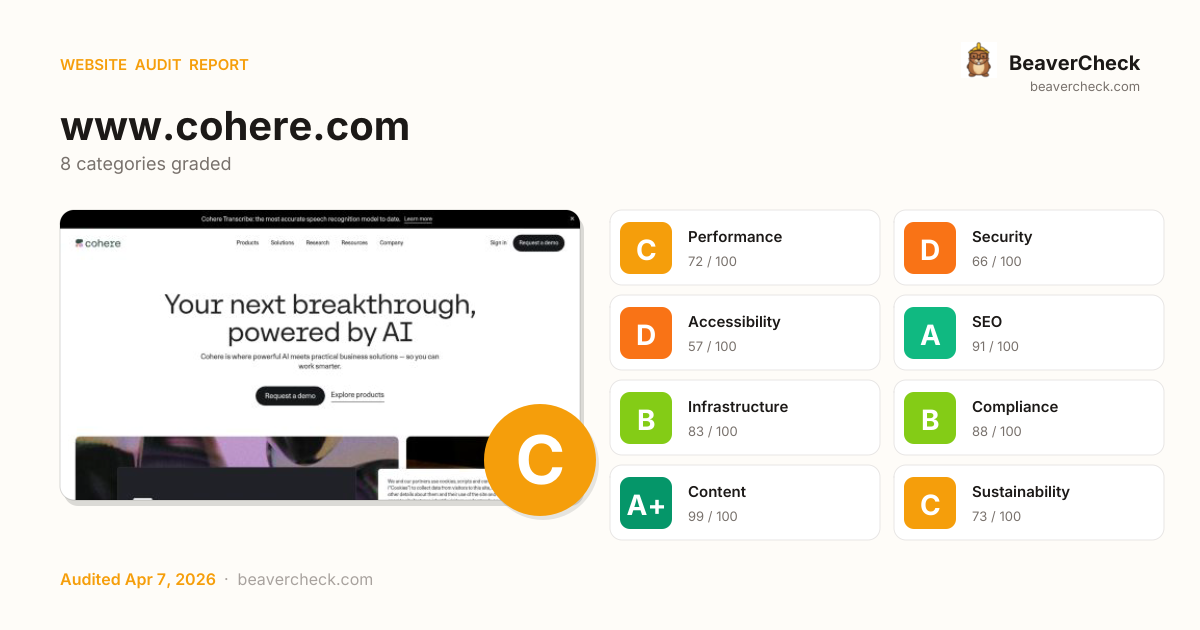
C74

Site Health

Score: 74 / 100

Based on 8 categories, 0 sections

How is this calculated?

The overall score is a weighted average of individual category scores. Categories with more impact on user experience and security carry more weight.

Performance 25%Security 25%Accessibility 15%SEO 10%Infrastructure 10%Compliance 8%Content 5%Sustainability 2%

Weights reflect general web best practices. Individual needs may differ.

Top Priorities (5)

1

Content-Security-Policy header is missing

Security › Security Headers
2

No Content-Security-Policy header found

Security › Content Security Policy
3

Page weighs 10.9 MB (4.7 MB transferred)

Performance › Page Weight Budget
4

1 button(s) with no accessible text

Accessibility › Link & Button Quality
5

6 image-only link(s) without alt text

Accessibility › Link & Button Quality
BeaverCheck badge
Embed this badge
[![BeaverCheck](https://beavercheck.com/badge?url=https%3A%2F%2Fwww.cohere.com)](https://beavercheck.com/results/2ef6bff8-0317-a665-0ca8-fa94f08ffaad)
<a href="https://beavercheck.com/results/2ef6bff8-0317-a665-0ca8-fa94f08ffaad"><img src="https://beavercheck.com/badge?url=https%3A%2F%2Fwww.cohere.com" alt="BeaverCheck Score"></a>
https://beavercheck.com/badge?url=https%3A%2F%2Fwww.cohere.com

This badge auto-updates with your latest scan result.

Was this report useful?

Thanks for your feedback!

Lighthouse Scores

Industry-standard audits powered by Google Lighthouse.

27
Performance Overall performance score (0–100) based on Core Web Vitals and other metrics. 90+ is good.
98
Accessibility Measures how accessible the page is for users with disabilities. Checks color contrast, ARIA labels, and semantic HTML.
96
Best Practices Checks for modern web development best practices including HTTPS, no console errors, and secure JavaScript.
92
SEO Measures basic SEO optimizations: meta tags, crawlability, link text, and mobile friendliness.

Core Web Vitals

Key metrics that affect user experience.

First Contentful Paint First Contentful Paint — how long until the browser renders the first piece of content. Under 1.8s is good.

4.48 s

Largest Contentful Paint Largest Contentful Paint — how long until the largest visible element loads. Under 2.5s is good.

22.56 s

Total Blocking Time Total Blocking Time — total time the main thread was blocked, preventing user input. Under 200ms is good.

3.92 s

Cumulative Layout Shift Cumulative Layout Shift — measures visual stability. How much the page layout shifts during loading. Under 0.1 is good.

0.000

Speed Index Speed Index — how quickly content is visually displayed during load. Under 3.4s is good.

13.31 s

Time to Interactive Time to Interactive — how long until the page is fully interactive and responds to user input. Under 3.8s is good.

26.62 s

Detailed Report

Audit breakdown by category with detailed findings.

27

Performance

Insights

Remove large, duplicate JavaScript modules from bundles to reduce unnecessary bytes consumed by network activity.

Polyfills and transforms enable older browsers to use new JavaScript features. However, many aren't necessary for modern browsers. Consider modifying your JavaScript build process to not transpile Baseline features, unless you know you must support older browsers. Learn why most sites can deploy ES6+ code without transpiling

3rd party code can significantly impact load performance. Reduce and defer loading of 3rd party code to prioritize your page's content.

Your first network request is the most important. Reduce its latency by avoiding redirects, ensuring a fast server response, and enabling text compression.

Consider setting font-display to swap or optional to ensure text is consistently visible. swap can be further optimized to mitigate layout shifts with font metric overrides.

A forced reflow occurs when JavaScript queries geometric properties (such as offsetWidth) after styles have been invalidated by a change to the DOM state. This can result in poor performance. Learn more about forced reflows and possible mitigations.

headings: [map[key:source label:Source valueType:source-location] map[granularity:1 key:reflowTime label:Total reflow time valueType:ms]]
items: [map[reflowTime:60.438 source:map[type:text value:[unattributed]]] map[reflowTime:56.805 source:map[column:22706 line:0 type:source-location url:https://cdn-cookieyes.com/client_data/72267d03a3814ff1204bd164/banner.js urlProvider:network]] map[reflowTime:0.452 source:map[column:3195 line:24 type:source-location url:https://cohere.com/_next/static/chunks/8043-a2ddd12a50120d22.js urlProvider:network]]]

Reducing the download time of images can improve the perceived load time of the page and LCP. Learn more about optimizing image size

URLResource SizeEst Savings
footer.relative > section.relative > div.absolute > img.block footer.relative > section.relative > div.absolute > img.block
/images/rjtqmwfu/web3-prod/e6a8075c9b6ed82405bfea0c8b4568...292.3 KiB255.4 KiB
Background image div.flex > div.relative > div.relative > img.absolute
/images/rjtqmwfu/web3-prod/2bdf37ce948a075fe68d570a9da1b1...197.7 KiB187.0 KiB
Close-up of a wind turbine against a clear blue sky, with blurred plants in the… a.inline-block > div.group/card > div.relative > img.h-full
/images/rjtqmwfu/web3-prod/ef4c547b886577f369e62da9e88649...136.9 KiB123.3 KiB
Nighttime view of tall office skyscrapers with illuminated windows, creating a … a.inline-block > div.group/card > div.relative > img.h-full
/images/rjtqmwfu/web3-prod/30ec75e875e50726980c6a68a63b31...135.8 KiB122.2 KiB
main > section.w-full > div.absolute > img.block main > section.w-full > div.absolute > img.block
/images/rjtqmwfu/web3-prod/3f55c7c49026cca81ee85c347c84f1...158.6 KiB113.3 KiB
Close-up of a person’s hands typing on a mechanical keyboard on a wooden desk, … a.inline-block > div.group/card > div.relative > img.h-full
/images/rjtqmwfu/web3-prod/b5264330c568955041d465542469eb...121.9 KiB108.3 KiB
Close-up view of modern, curved, white staircases with a minimalist architectur… a.inline-block > div.group/card > div.relative > img.h-full
/images/rjtqmwfu/web3-prod/c422cea71d363bc9dbe8f93a7114f6...103.3 KiB91.1 KiB
main > section.relative > div.absolute > img.block main > section.relative > div.absolute > img.block
/images/rjtqmwfu/web3-prod/59c810e472d014a11fe8895a69b3f0...117.8 KiB82.6 KiB
Woman speaking on the phone while working. div.relative > div.flex > div.relative > img.h-full
/images/rjtqmwfu/web3-prod/60898fc5b86d38de0dafde5f3520c3...80.6 KiB73.7 KiB
Close-up of a translucent liquid droplet with multiple small bubbles inside, se… a.inline-block > div.group/card > div.relative > img.h-full
/images/rjtqmwfu/web3-prod/871cc9ed4e63113205ab55e2a6cb20...82.7 KiB72.9 KiB
image of a satellite receiver a.inline-block > div.group/card > div.relative > img.h-full
/images/rjtqmwfu/web3-prod/d27ed0826c77f9b4bdfab940945576...70.0 KiB61.8 KiB
Screenshot of a "Trend Forecasting Agent" interface showing an uploaded Excel f… div.flex > div.w-full > div.block > img.m-auto
/images/rjtqmwfu/web3-prod/485c110e5e139511521b507a2731df...68.9 KiB59.6 KiB
Cohere developer documentation page showing instructions for creating a client … div.flex > div.w-full > div.block > img.m-auto
/images/rjtqmwfu/web3-prod/53bdb371305538ab5186498794ab35...45.1 KiB39.0 KiB
Illustration of Command interface generating a product description. The top sec… div.relative > div.flex > div.mb-10 > img.rounded-xl
/images/rjtqmwfu/web3-prod/0ea462b7b3d6aee933777aadc96be7...45.0 KiB38.8 KiB
Silhouette of a person wearing a beanie inside a vehicle or cabin, illuminated … a.inline-block > div.group/card > div.relative > img.h-full
/images/rjtqmwfu/web3-prod/6ae6fc28f20cc442e8853d60392c50...21.7 KiB19.1 KiB
Background image div.flex > div.relative > div.relative > img.absolute
/images/rjtqmwfu/web3-prod/b69260eb0e7a7e01b46e46ef7a1564...28.6 KiB6.3 KiB

Each subpart has specific improvement strategies. Ideally, most of the LCP time should be spent on loading the resources, not within delays.

headings: [map[key:label label:Subpart valueType:text] map[key:duration label:Duration valueType:ms]]
items: [map[duration:76.941 label:Time to first byte subpart:timeToFirstByte] map[duration:85.157 label:Resource load delay subpart:resourceLoadDelay] map[duration:544.351 label:Resource load duration subpart:resourceLoadDuration] map[duration:2621.335 label:Element render delay subpart:elementRenderDelay]]
lhId: page-16-IMG
nodeLabel: Background image
path: 1,HTML,1,BODY,4,DIV,3,DIV,2,MAIN,2,SECTION,0,DIV,0,DIV,0,DIV,0,DIV,0,IMG
selector: div.flex > div.relative > div.relative > img.absolute
snippet: <img alt="Background image" class="absolute inset-0 h-full w-full object-cover" fetchpriority="high" srcset="https://cdn.sanity.io/images/rjtqmwfu/web3-prod/b69260eb0e7a7e01b46e46ef7a…" src="https://cdn.sanity.io/images/rjtqmwfu/web3-prod/b69260eb0e7a7e01b46e46ef7a…" width="900" height="375">

Avoid chaining critical requests by reducing the length of chains, reducing the download size of resources, or deferring the download of unnecessary resources to improve page load.

description: [preconnect](https://developer.chrome.com/docs/lighthouse/performance/uses-rel-preconnect/) hints help the browser establish a connection earlier in the page load, saving time when the first request for that origin is made. The following are the origins that the page preconnected to.
title: Preconnected origins
value: no origins were preconnected
description: Add [preconnect](https://developer.chrome.com/docs/lighthouse/performance/uses-rel-preconnect/) hints to your most important origins, but try to use no more than 4.
title: Preconnect candidates

Requests are blocking the page's initial render, which may delay LCP. Deferring or inlining can move these network requests out of the critical path.

A long cache lifetime can speed up repeat visits to your page. Learn more about caching.

These insights are also available in the Chrome DevTools Performance Panel - record a trace to view more detailed information.

Time to Interactive is the amount of time it takes for the page to become fully interactive. Learn more about the Time to Interactive metric.

TTI

The maximum potential First Input Delay that your users could experience is the duration of the longest task. Learn more about the Maximum Potential First Input Delay metric.

Redirects introduce additional delays before the page can be loaded. Learn how to avoid page redirects.

Estimated savings: 766 ms
URLTime Spent
www.cohere.com/766 ms
cohere.com/0.0 ms

Diagnostics

Reduce unused rules from stylesheets and defer CSS not used for above-the-fold content to decrease bytes consumed by network activity. Learn how to reduce unused CSS.

Estimated savings: 150 ms 41.1 KiB

Consider reducing the time spent parsing, compiling, and executing JS. You may find delivering smaller JS payloads helps with this. Learn how to reduce Javascript execution time.

Consider reducing the time spent parsing, compiling and executing JS. You may find delivering smaller JS payloads helps with this. Learn how to minimize main-thread work

CategoryTime Spent
Script Evaluation10.6 s
Other2.9 s
Style & Layout1.3 s
Script Parsing & Compilation1.3 s
Garbage Collection571 ms
Rendering420 ms
Parse HTML & CSS218 ms

More information about the performance of your application. These numbers don't directly affect the Performance score.

Layout shift culprits
Optimize DOM size
LCP request discovery
Modern HTTP
Optimize viewport for mobile
Minify CSS
Minify JavaScript
User Timing marks and measures 5 user timings
Avoid long main-thread tasks 20 long tasks found
Avoid non-composited animations 2 animated elements found
Image elements have explicit `width` and `height`
Page didn't prevent back/forward cache restoration
Network Requests
Network Round Trip Times 100 ms
Server Backend Latencies 320 ms
Tasks
Diagnostics
Metrics
Screenshot Thumbnails
Final Screenshot
Script Treemap Data
Resources Summary
Initial server response time was short Root document took 10 ms
INP breakdown
Avoid large layout shifts
98

Accessibility

These checks highlight opportunities to improve the accessibility of your web app. Automatic detection can only detect a subset of issues and does not guarantee the accessibility of your web app, so manual testing is also encouraged.

Navigation

Properly ordered headings that do not skip levels convey the semantic structure of the page, making it easier to navigate and understand when using assistive technologies. Learn more about heading order.

Failing Elements
Safe. Flexible. Built for business. div.text-center > div.motion-safe:opacity-0 > div.break-words > h3.text-web3-28
Command li.w-full > div.w-full > button.flex > h5.text-web3-20

These are opportunities to improve keyboard navigation in your application.

Visible text labels that do not match the accessible name can result in a confusing experience for screen reader users. Learn more about accessible names.

Failing Elements
Financial Services div.mb-5 > div.w-screen > div.flex > a.inline-block
Public Sector div.mb-5 > div.w-screen > div.flex > a.inline-block
Energy div.mb-5 > div.w-screen > div.flex > a.inline-block
Technology div.mb-5 > div.w-screen > div.flex > a.inline-block
Healthcare div.mb-5 > div.w-screen > div.flex > a.inline-block
Manufacturing div.mb-5 > div.w-screen > div.flex > a.inline-block
Telecommunications div.mb-5 > div.w-screen > div.flex > a.inline-block
Interactive controls are keyboard focusable
Interactive elements indicate their purpose and state
The page has a logical tab order
Visual order on the page follows DOM order
User focus is not accidentally trapped in a region
The user's focus is directed to new content added to the page
HTML5 landmark elements are used to improve navigation
Offscreen content is hidden from assistive technology
Custom controls have associated labels
Custom controls have ARIA roles
`[aria-*]` attributes match their roles
`[aria-hidden="true"]` is not present on the document `<body>`
`[role]`s have all required `[aria-*]` attributes
`[role]` values are valid
`[aria-*]` attributes have valid values
`[aria-*]` attributes are valid and not misspelled
Buttons have an accessible name
Image elements have `[alt]` attributes
Form elements have associated labels
`[user-scalable="no"]` is not used in the `<meta name="viewport">` element and the `[maximum-scale]` attribute is not less than 5.
ARIA attributes are used as specified for the element's role
`[aria-hidden="true"]` elements do not contain focusable descendents
Elements use only permitted ARIA attributes
Background and foreground colors have a sufficient contrast ratio
Document has a `<title>` element
`<html>` element has a `[lang]` attribute
`<html>` element has a valid value for its `[lang]` attribute
Links are distinguishable without relying on color.
Links have a discernible name
Lists contain only `<li>` elements and script supporting elements (`<script>` and `<template>`).
List items (`<li>`) are contained within `<ul>`, `<ol>` or `<menu>` parent elements
No element has a `[tabindex]` value greater than 0
Touch targets have sufficient size and spacing.
Document has a main landmark.
Deprecated ARIA roles were not used
Identical links have the same purpose.
`[accesskey]` values are unique
`button`, `link`, and `menuitem` elements have accessible names
Elements with `role="dialog"` or `role="alertdialog"` have accessible names.
ARIA input fields have accessible names
ARIA `meter` elements have accessible names
ARIA `progressbar` elements have accessible names
Elements with an ARIA `[role]` that require children to contain a specific `[role]` have all required children.
`[role]`s are contained by their required parent element
Elements with the `role=text` attribute do not have focusable descendents.
ARIA toggle fields have accessible names
ARIA `tooltip` elements have accessible names
ARIA `treeitem` elements have accessible names
The page contains a heading, skip link, or landmark region
`<dl>`'s contain only properly-ordered `<dt>` and `<dd>` groups, `<script>`, `<template>` or `<div>` elements.
Definition list items are wrapped in `<dl>` elements
ARIA IDs are unique
No form fields have multiple labels
`<frame>` or `<iframe>` elements have a title
`<html>` element has an `[xml:lang]` attribute with the same base language as the `[lang]` attribute.
Input buttons have discernible text.
`<input type="image">` elements have `[alt]` text
The document does not use `<meta http-equiv="refresh">`
`<object>` elements have alternate text
Select elements have associated label elements.
Skip links are focusable.
Cells in a `<table>` element that use the `[headers]` attribute refer to table cells within the same table.
`<th>` elements and elements with `[role="columnheader"/"rowheader"]` have data cells they describe.
`[lang]` attributes have a valid value
`<video>` elements contain a `<track>` element with `[kind="captions"]`
Tables have different content in the summary attribute and `<caption>`.
All heading elements contain content.
Uses ARIA roles only on compatible elements
Image elements do not have `[alt]` attributes that are redundant text.
Tables use `<caption>` instead of cells with the `[colspan]` attribute to indicate a caption.
`<td>` elements in a large `<table>` have one or more table headers.
96

Best Practices

General

Errors logged to the console indicate unresolved problems. They can come from network request failures and other browser concerns. Learn more about this errors in console diagnostic audit

SourceDescription
Uncaught Error: Looks like your website URL has changed. To ensure the proper functioning of your banner, update the registered URL on your CookieYes account (navigate to the Organizations & Sites page (https://app.cookieyes.com/settings/organizations-and-sites) and click the More button associated with your site). Then, reload this page to retry. If the issue persists, please contact us at https://www.cookieyes.com/support.

Source maps translate minified code to the original source code. This helps developers debug in production. In addition, Lighthouse is able to provide further insights. Consider deploying source maps to take advantage of these benefits. Learn more about source maps.

Uses HTTPS
Avoids deprecated APIs
Avoids third-party cookies
Allows users to paste into input fields
Avoids requesting the geolocation permission on page load
Avoids requesting the notification permission on page load
Displays images with correct aspect ratio
Serves images with appropriate resolution
Page has the HTML doctype
Properly defines charset
No issues in the `Issues` panel in Chrome Devtools
Ensure CSP is effective against XSS attacks
Use a strong HSTS policy
Ensure proper origin isolation with COOP
Mitigate clickjacking with XFO or CSP
Mitigate DOM-based XSS with Trusted Types
Redirects HTTP traffic to HTTPS
Detected JavaScript libraries
92

SEO

These checks ensure that your page is following basic search engine optimization advice. There are many additional factors Lighthouse does not score here that may affect your search ranking, including performance on Core Web Vitals. Learn more about Google Search Essentials.

Content Best Practices

Descriptive link text helps search engines understand your content. Learn how to make links more accessible.

Format your HTML in a way that enables crawlers to better understand your app’s content.

Structured data is valid
Page isn’t blocked from indexing
Document has a `<title>` element
Document has a meta description
Page has successful HTTP status code
Links are crawlable
robots.txt is valid
Image elements have `[alt]` attributes
Document has a valid `hreflang`
Document has a valid `rel=canonical`

Lighthouse Scores

Industry-standard audits powered by Google Lighthouse. — Desktop

56
Performance Overall performance score (0–100) based on Core Web Vitals and other metrics. 90+ is good.
98
Accessibility Measures how accessible the page is for users with disabilities. Checks color contrast, ARIA labels, and semantic HTML.
96
Best Practices Checks for modern web development best practices including HTTPS, no console errors, and secure JavaScript.
92
SEO Measures basic SEO optimizations: meta tags, crawlability, link text, and mobile friendliness.

Core Web Vitals

Key metrics that affect user experience. — Desktop

First Contentful Paint First Contentful Paint — how long until the browser renders the first piece of content. Under 1.8s is good.

830 ms

Largest Contentful Paint Largest Contentful Paint — how long until the largest visible element loads. Under 2.5s is good.

2.46 s

Total Blocking Time Total Blocking Time — total time the main thread was blocked, preventing user input. Under 200ms is good.

520 ms

Cumulative Layout Shift Cumulative Layout Shift — measures visual stability. How much the page layout shifts during loading. Under 0.1 is good.

0.000

Speed Index Speed Index — how quickly content is visually displayed during load. Under 3.4s is good.

3.63 s

Time to Interactive Time to Interactive — how long until the page is fully interactive and responds to user input. Under 3.8s is good.

7.62 s

Detailed Report

Audit breakdown by category with detailed findings.

56

Performance

Insights

Remove large, duplicate JavaScript modules from bundles to reduce unnecessary bytes consumed by network activity.

Polyfills and transforms enable older browsers to use new JavaScript features. However, many aren't necessary for modern browsers. Consider modifying your JavaScript build process to not transpile Baseline features, unless you know you must support older browsers. Learn why most sites can deploy ES6+ code without transpiling

3rd party code can significantly impact load performance. Reduce and defer loading of 3rd party code to prioritize your page's content.

Your first network request is the most important. Reduce its latency by avoiding redirects, ensuring a fast server response, and enabling text compression.

Consider setting font-display to swap or optional to ensure text is consistently visible. swap can be further optimized to mitigate layout shifts with font metric overrides.

A forced reflow occurs when JavaScript queries geometric properties (such as offsetWidth) after styles have been invalidated by a change to the DOM state. This can result in poor performance. Learn more about forced reflows and possible mitigations.

headings: [map[key:source label:Source valueType:source-location] map[granularity:1 key:reflowTime label:Total reflow time valueType:ms]]
items: [map[reflowTime:41.821 source:map[type:text value:[unattributed]]] map[reflowTime:59.637 source:map[column:3195 line:24 type:source-location url:https://cohere.com/_next/static/chunks/8043-a2ddd12a50120d22.js urlProvider:network]]]

Reducing the download time of images can improve the perceived load time of the page and LCP. Learn more about optimizing image size

URLResource SizeEst Savings
Aerial view of Tokyo Tower surrounded by skyscrapers during sunset, with a colo… div.relative > div.absolute > div.h-full > img.z-2
/images/rjtqmwfu/web3-prod/b9481e05f8f2e1d27618b4e23cf057...550.1 KiB473.1 KiB
main > section.relative > div.absolute > img.hidden main > section.relative > div.absolute > img.hidden
/images/rjtqmwfu/web3-prod/59c810e472d014a11fe8895a69b3f0...342.1 KiB169.0 KiB
Close-up of a wind turbine against a clear blue sky, with blurred plants in the… a.inline-block > div.group/card > div.relative > img.h-full
/images/rjtqmwfu/web3-prod/ef4c547b886577f369e62da9e88649...136.9 KiB108.1 KiB
Nighttime view of tall office skyscrapers with illuminated windows, creating a … a.inline-block > div.group/card > div.relative > img.h-full
/images/rjtqmwfu/web3-prod/30ec75e875e50726980c6a68a63b31...135.8 KiB107.1 KiB
Close-up of a person’s hands typing on a mechanical keyboard on a wooden desk, … a.inline-block > div.group/card > div.relative > img.h-full
/images/rjtqmwfu/web3-prod/b5264330c568955041d465542469eb...121.9 KiB93.2 KiB
Illustration of Command interface generating a product description. The top sec… div.relative > div.flex > div.mb-10 > img.rounded-xl
/images/rjtqmwfu/web3-prod/0ea462b7b3d6aee933777aadc96be7...108.5 KiB91.0 KiB
Screenshot of a "Trend Forecasting Agent" interface showing an uploaded Excel f… div.flex > div.w-full > div.hidden > img.m-auto
/images/rjtqmwfu/web3-prod/485c110e5e139511521b507a2731df...96.4 KiB80.1 KiB
Close-up view of modern, curved, white staircases with a minimalist architectur… a.inline-block > div.group/card > div.relative > img.h-full
/images/rjtqmwfu/web3-prod/c422cea71d363bc9dbe8f93a7114f6...103.3 KiB77.5 KiB
Background image div.flex > div.relative > div.relative > img.absolute
/images/rjtqmwfu/web3-prod/b69260eb0e7a7e01b46e46ef7a1564...145.0 KiB68.0 KiB
Close-up of a translucent liquid droplet with multiple small bubbles inside, se… a.inline-block > div.group/card > div.relative > img.h-full
/images/rjtqmwfu/web3-prod/871cc9ed4e63113205ab55e2a6cb20...82.7 KiB62.1 KiB
Cohere developer documentation page showing instructions for creating a client … div.flex > div.w-full > div.hidden > img.m-auto
/images/rjtqmwfu/web3-prod/53bdb371305538ab5186498794ab35...74.5 KiB62.0 KiB
Woman speaking on the phone while working. div.relative > div.flex > div.relative > img.h-full
/images/rjtqmwfu/web3-prod/60898fc5b86d38de0dafde5f3520c3...80.6 KiB59.1 KiB
image of a satellite receiver a.inline-block > div.group/card > div.relative > img.h-full
/images/rjtqmwfu/web3-prod/d27ed0826c77f9b4bdfab940945576...70.0 KiB52.5 KiB
main > section.w-full > div.absolute > img.hidden main > section.w-full > div.absolute > img.hidden
/images/rjtqmwfu/web3-prod/d59ed9db0ddb73f0ea4faac7947f9e...223.4 KiB50.4 KiB
div.relative > div.mb-10 > a.group/fullImage > img.aspect-square div.relative > div.mb-10 > a.group/fullImage > img.aspect-square
/images/rjtqmwfu/web3-prod/c0c46b9c5008a6c82db0cf1c2acf23...45.5 KiB34.1 KiB
div.relative > div.mb-10 > a.group/fullImage > img.aspect-square div.relative > div.mb-10 > a.group/fullImage > img.aspect-square
/images/rjtqmwfu/web3-prod/59fde454e2ea82b26d068438e4344a...29.6 KiB22.2 KiB
Silhouette of a person wearing a beanie inside a vehicle or cabin, illuminated … a.inline-block > div.group/card > div.relative > img.h-full
/images/rjtqmwfu/web3-prod/6ae6fc28f20cc442e8853d60392c50...21.7 KiB16.3 KiB

Avoid chaining critical requests by reducing the length of chains, reducing the download size of resources, or deferring the download of unnecessary resources to improve page load.

description: [preconnect](https://developer.chrome.com/docs/lighthouse/performance/uses-rel-preconnect/) hints help the browser establish a connection earlier in the page load, saving time when the first request for that origin is made. The following are the origins that the page preconnected to.
title: Preconnected origins
value: no origins were preconnected
description: Add [preconnect](https://developer.chrome.com/docs/lighthouse/performance/uses-rel-preconnect/) hints to your most important origins, but try to use no more than 4.
title: Preconnect candidates
value: No additional origins are good candidates for preconnecting

A long cache lifetime can speed up repeat visits to your page. Learn more about caching.

These insights are also available in the Chrome DevTools Performance Panel - record a trace to view more detailed information.

Redirects introduce additional delays before the page can be loaded. Learn how to avoid page redirects.

Estimated savings: 225 ms
URLTime Spent
www.cohere.com/225 ms
cohere.com/0.0 ms

The maximum potential First Input Delay that your users could experience is the duration of the longest task. Learn more about the Maximum Potential First Input Delay metric.

Time to Interactive is the amount of time it takes for the page to become fully interactive. Learn more about the Time to Interactive metric.

TTI

Diagnostics

Reduce unused rules from stylesheets and defer CSS not used for above-the-fold content to decrease bytes consumed by network activity. Learn how to reduce unused CSS.

Estimated savings: 80 ms 37.6 KiB

Consider reducing the time spent parsing, compiling and executing JS. You may find delivering smaller JS payloads helps with this. Learn how to minimize main-thread work

CategoryTime Spent
Script Evaluation2.8 s
Other1.2 s
Style & Layout421 ms
Script Parsing & Compilation289 ms
Rendering224 ms
Garbage Collection164 ms
Parse HTML & CSS67 ms

More information about the performance of your application. These numbers don't directly affect the Performance score.

Layout shift culprits
Optimize DOM size
LCP breakdown
LCP request discovery
Modern HTTP
Optimize viewport for mobile
Minify CSS
Minify JavaScript
User Timing marks and measures 5 user timings
Avoid long main-thread tasks 9 long tasks found
Avoid non-composited animations 1 animated element found
Image elements have explicit `width` and `height`
Page didn't prevent back/forward cache restoration
Network Requests
Network Round Trip Times 100 ms
Server Backend Latencies 180 ms
Tasks
Diagnostics
Metrics
Screenshot Thumbnails
Final Screenshot
Script Treemap Data
Resources Summary
Initial server response time was short Root document took 10 ms
Avoid large layout shifts 1 layout shift found
INP breakdown
98

Accessibility

These checks highlight opportunities to improve the accessibility of your web app. Automatic detection can only detect a subset of issues and does not guarantee the accessibility of your web app, so manual testing is also encouraged.

Navigation

Properly ordered headings that do not skip levels convey the semantic structure of the page, making it easier to navigate and understand when using assistive technologies. Learn more about heading order.

Failing Elements
Safe. Flexible. Built for business. div.text-center > div.motion-safe:opacity-0 > div.break-words > h3.text-web3-28
Command li.w-full > div.w-full > button.flex > h5.text-web3-20

These are opportunities to improve keyboard navigation in your application.

Visible text labels that do not match the accessible name can result in a confusing experience for screen reader users. Learn more about accessible names.

Failing Elements
Financial Services div.mb-5 > div.w-screen > div.flex > a.inline-block
Public Sector div.mb-5 > div.w-screen > div.flex > a.inline-block
Energy div.mb-5 > div.w-screen > div.flex > a.inline-block
Technology div.mb-5 > div.w-screen > div.flex > a.inline-block
Healthcare div.mb-5 > div.w-screen > div.flex > a.inline-block
Manufacturing div.mb-5 > div.w-screen > div.flex > a.inline-block
Telecommunications div.mb-5 > div.w-screen > div.flex > a.inline-block
Interactive controls are keyboard focusable
Interactive elements indicate their purpose and state
The page has a logical tab order
Visual order on the page follows DOM order
User focus is not accidentally trapped in a region
The user's focus is directed to new content added to the page
HTML5 landmark elements are used to improve navigation
Offscreen content is hidden from assistive technology
Custom controls have associated labels
Custom controls have ARIA roles
`[aria-*]` attributes match their roles
`[aria-hidden="true"]` is not present on the document `<body>`
`[role]`s have all required `[aria-*]` attributes
`[role]` values are valid
`[aria-*]` attributes have valid values
`[aria-*]` attributes are valid and not misspelled
Buttons have an accessible name
Image elements have `[alt]` attributes
Form elements have associated labels
`[user-scalable="no"]` is not used in the `<meta name="viewport">` element and the `[maximum-scale]` attribute is not less than 5.
ARIA attributes are used as specified for the element's role
`[aria-hidden="true"]` elements do not contain focusable descendents
Elements use only permitted ARIA attributes
Background and foreground colors have a sufficient contrast ratio
Document has a `<title>` element
`<html>` element has a `[lang]` attribute
`<html>` element has a valid value for its `[lang]` attribute
Links are distinguishable without relying on color.
Links have a discernible name
Lists contain only `<li>` elements and script supporting elements (`<script>` and `<template>`).
List items (`<li>`) are contained within `<ul>`, `<ol>` or `<menu>` parent elements
No element has a `[tabindex]` value greater than 0
Touch targets have sufficient size and spacing.
Document has a main landmark.
Deprecated ARIA roles were not used
Identical links have the same purpose.
`[accesskey]` values are unique
`button`, `link`, and `menuitem` elements have accessible names
Elements with `role="dialog"` or `role="alertdialog"` have accessible names.
ARIA input fields have accessible names
ARIA `meter` elements have accessible names
ARIA `progressbar` elements have accessible names
Elements with an ARIA `[role]` that require children to contain a specific `[role]` have all required children.
`[role]`s are contained by their required parent element
Elements with the `role=text` attribute do not have focusable descendents.
ARIA toggle fields have accessible names
ARIA `tooltip` elements have accessible names
ARIA `treeitem` elements have accessible names
The page contains a heading, skip link, or landmark region
`<dl>`'s contain only properly-ordered `<dt>` and `<dd>` groups, `<script>`, `<template>` or `<div>` elements.
Definition list items are wrapped in `<dl>` elements
ARIA IDs are unique
No form fields have multiple labels
`<frame>` or `<iframe>` elements have a title
`<html>` element has an `[xml:lang]` attribute with the same base language as the `[lang]` attribute.
Input buttons have discernible text.
`<input type="image">` elements have `[alt]` text
The document does not use `<meta http-equiv="refresh">`
`<object>` elements have alternate text
Select elements have associated label elements.
Skip links are focusable.
Cells in a `<table>` element that use the `[headers]` attribute refer to table cells within the same table.
`<th>` elements and elements with `[role="columnheader"/"rowheader"]` have data cells they describe.
`[lang]` attributes have a valid value
`<video>` elements contain a `<track>` element with `[kind="captions"]`
Tables have different content in the summary attribute and `<caption>`.
All heading elements contain content.
Uses ARIA roles only on compatible elements
Image elements do not have `[alt]` attributes that are redundant text.
Tables use `<caption>` instead of cells with the `[colspan]` attribute to indicate a caption.
`<td>` elements in a large `<table>` have one or more table headers.
96

Best Practices

General

Errors logged to the console indicate unresolved problems. They can come from network request failures and other browser concerns. Learn more about this errors in console diagnostic audit

SourceDescription
Uncaught Error: Looks like your website URL has changed. To ensure the proper functioning of your banner, update the registered URL on your CookieYes account (navigate to the Organizations & Sites page (https://app.cookieyes.com/settings/organizations-and-sites) and click the More button associated with your site). Then, reload this page to retry. If the issue persists, please contact us at https://www.cookieyes.com/support.

Source maps translate minified code to the original source code. This helps developers debug in production. In addition, Lighthouse is able to provide further insights. Consider deploying source maps to take advantage of these benefits. Learn more about source maps.

Uses HTTPS
Avoids deprecated APIs
Avoids third-party cookies
Allows users to paste into input fields
Avoids requesting the geolocation permission on page load
Avoids requesting the notification permission on page load
Displays images with correct aspect ratio
Serves images with appropriate resolution
Page has the HTML doctype
Properly defines charset
No issues in the `Issues` panel in Chrome Devtools
Ensure CSP is effective against XSS attacks
Use a strong HSTS policy
Ensure proper origin isolation with COOP
Mitigate clickjacking with XFO or CSP
Mitigate DOM-based XSS with Trusted Types
Redirects HTTP traffic to HTTPS
Detected JavaScript libraries
92

SEO

These checks ensure that your page is following basic search engine optimization advice. There are many additional factors Lighthouse does not score here that may affect your search ranking, including performance on Core Web Vitals. Learn more about Google Search Essentials.

Content Best Practices

Descriptive link text helps search engines understand your content. Learn how to make links more accessible.

Format your HTML in a way that enables crawlers to better understand your app’s content.

Structured data is valid
Page isn’t blocked from indexing
Document has a `<title>` element
Document has a meta description
Page has successful HTTP status code
Links are crawlable
robots.txt is valid
Image elements have `[alt]` attributes
Document has a valid `hreflang`
Document has a valid `rel=canonical`

Send Feedback