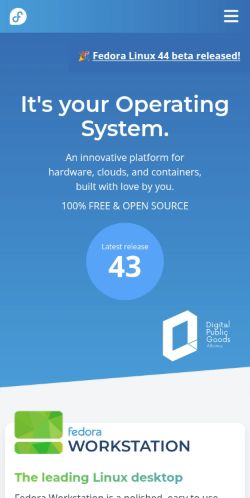
Mobile 375 × 812

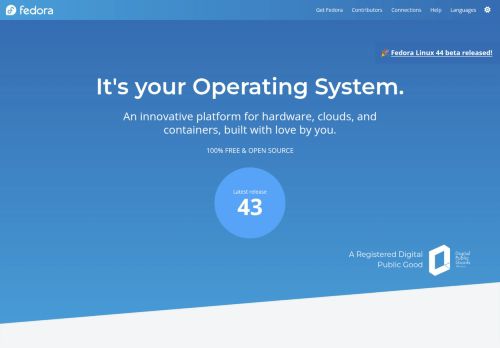
Desktop 1440 × 900

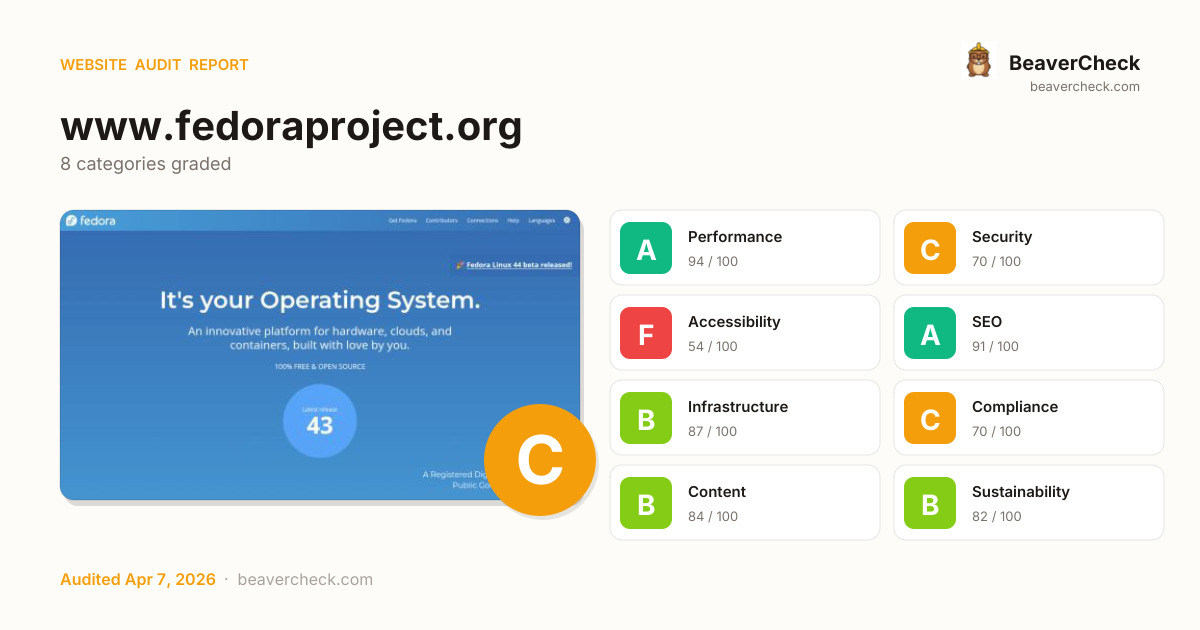
Score: 78 / 100
Based on 8 categories, 0 sections
The overall score is a weighted average of individual category scores. Categories with more impact on user experience and security carry more weight.
Weights reflect general web best practices. Individual needs may differ.
Content-Security-Policy header is missing
No Content-Security-Policy header found
1 button(s) with no accessible text
17 image(s) missing alt attribute
4 image-in-link without alt text
[](https://beavercheck.com/results/670542e0-6791-f4ea-a889-96fde02fd4f9)<a href="https://beavercheck.com/results/670542e0-6791-f4ea-a889-96fde02fd4f9"><img src="https://beavercheck.com/badge?url=https%3A%2F%2Fwww.fedoraproject.org" alt="BeaverCheck Score"></a>https://beavercheck.com/badge?url=https%3A%2F%2Fwww.fedoraproject.orgThis badge auto-updates with your latest scan result.
Thanks for your feedback!
Industry-standard audits powered by Google Lighthouse.
Key metrics that affect user experience.
First Contentful Paint First Contentful Paint — how long until the browser renders the first piece of content. Under 1.8s is good.
1.36 s
Largest Contentful Paint Largest Contentful Paint — how long until the largest visible element loads. Under 2.5s is good.
4.66 s
Total Blocking Time Total Blocking Time — total time the main thread was blocked, preventing user input. Under 200ms is good.
0 ms
Cumulative Layout Shift Cumulative Layout Shift — measures visual stability. How much the page layout shifts during loading. Under 0.1 is good.
0.018
Speed Index Speed Index — how quickly content is visually displayed during load. Under 3.4s is good.
1.36 s
Time to Interactive Time to Interactive — how long until the page is fully interactive and responds to user input. Under 3.8s is good.
4.68 s
Audit breakdown by category with detailed findings.
Remove large, duplicate JavaScript modules from bundles to reduce unnecessary bytes consumed by network activity.
Polyfills and transforms enable older browsers to use new JavaScript features. However, many aren't necessary for modern browsers. Consider modifying your JavaScript build process to not transpile Baseline features, unless you know you must support older browsers. Learn why most sites can deploy ES6+ code without transpiling
3rd party code can significantly impact load performance. Reduce and defer loading of 3rd party code to prioritize your page's content.
A long cache lifetime can speed up repeat visits to your page. Learn more about caching.
Consider setting font-display to swap or optional to ensure text is consistently visible. swap can be further optimized to mitigate layout shifts with font metric overrides.
Reducing the download time of images can improve the perceived load time of the page and LCP. Learn more about optimizing image size
| URL | Resource Size | Est Savings | |
|---|---|---|---|
section.w-full > div.container > div.relative > img.FPImage section.w-full > div.container > div.relative > img.FPImage | www.fedoraproject.org/assets/images/cloud-logo-light.png | 22.5 KiB | 20.0 KiB |
section.w-full > div.container > div.relative > img.FPImage section.w-full > div.container > div.relative > img.FPImage | www.fedoraproject.org/assets/images/IoT-logo-light.png | 16.2 KiB | 14.3 KiB |
section.w-full > div.container > div.relative > img.FPImage section.w-full > div.container > div.relative > img.FPImage | www.fedoraproject.org/assets/images/workstation-logo-light.png | 15.8 KiB | 12.0 KiB |
Fedora Logo section.p-4 > div.mx-auto > div.w-[200px] > img.FPImage | www.fedoraproject.org/assets/images/logos/fedora-blue.png | 9.9 KiB | 8.8 KiB |
section.w-full > div.container > div.relative > img.FPImage section.w-full > div.container > div.relative > img.FPImage | www.fedoraproject.org/assets/images/coreos-logo-light.png | 11.4 KiB | 8.8 KiB |
section.w-full > div.container > div.relative > img.FPImage section.w-full > div.container > div.relative > img.FPImage | www.fedoraproject.org/assets/images/server-logo-light.png | 11.3 KiB | 8.8 KiB |
Sponsored by Red Hat Logo section.bg-black > div.mx-auto > div.w-[200px] > img.FPImage | www.fedoraproject.org/assets/images/logo-sponsored-by-red-hat.png | 8.3 KiB | 7.2 KiB |
section.w-full > div.container > div.relative > img.FPImage section.w-full > div.container > div.relative > img.FPImage | www.fedoraproject.org/assets/images/kde-logo-light.png | 9.5 KiB | 6.9 KiB |
Avoid chaining critical requests by reducing the length of chains, reducing the download size of resources, or deferring the download of unnecessary resources to improve page load.
Requests are blocking the page's initial render, which may delay LCP. Deferring or inlining can move these network requests out of the critical path.
| URL | Transfer Size | Duration |
|---|---|---|
| www.fedoraproject.org/assets/css/fontawesome.min.css | 20.2 KiB | 300 ms |
| www.fedoraproject.org/_nuxt/entry.BZUDMrtA.css | 13.2 KiB | 150 ms |
| www.fedoraproject.org/_nuxt/FpImage.ChWhdJEV.css | 307 B | |
| www.fedoraproject.org/_nuxt/default.DOs1B96t.css | 1.6 KiB |
These insights are also available in the Chrome DevTools Performance Panel - record a trace to view more detailed information.
Time to Interactive is the amount of time it takes for the page to become fully interactive. Learn more about the Time to Interactive metric.
Reduce unused rules from stylesheets and defer CSS not used for above-the-fold content to decrease bytes consumed by network activity. Learn how to reduce unused CSS.
| URL | Transfer Size | Est Savings |
|---|---|---|
| www.fedoraproject.org/assets/css/fontawesome.min.css | 20.1 KiB | 19.8 KiB |
| www.fedoraproject.org/_nuxt/entry.BZUDMrtA.css | 13.1 KiB | 11.4 KiB |
Set an explicit width and height on image elements to reduce layout shifts and improve CLS. Learn how to set image dimensions
| URL | |
|---|---|
section.w-full > div.container > div.relative > img.FPImage section.w-full > div.container > div.relative > img.FPImage | www.fedoraproject.org/assets/images/kde-logo-light.png |
section.w-full > div.container > div.relative > img.FPImage section.w-full > div.container > div.relative > img.FPImage | www.fedoraproject.org/assets/images/workstation-logo-light.png |
Fedora Logo section.p-4 > div.mx-auto > div.w-[200px] > img.FPImage | www.fedoraproject.org/assets/images/logos/fedora-blue.png |
section.w-full > div.container > div.relative > img.FPImage section.w-full > div.container > div.relative > img.FPImage | www.fedoraproject.org/assets/images/coreos-logo-light.png |
section.w-full > div.container > div.relative > img.FPImage section.w-full > div.container > div.relative > img.FPImage | www.fedoraproject.org/assets/images/server-logo-light.png |
section.w-full > div.container > div.relative > img.FPImage section.w-full > div.container > div.relative > img.FPImage | www.fedoraproject.org/assets/images/cloud-logo-light.png |
section.w-full > div.container > div.relative > img.FPImage section.w-full > div.container > div.relative > img.FPImage | www.fedoraproject.org/assets/images/IoT-logo-light.png |
section.align-end > a > div.flex > img.FPImage section.align-end > a > div.flex > img.FPImage | www.fedoraproject.org/assets/images/digital-public-goods.svg |
Sponsored by Red Hat Logo section.bg-black > div.mx-auto > div.w-[200px] > img.FPImage | www.fedoraproject.org/assets/images/logo-sponsored-by-red-hat.png |
More information about the performance of your application. These numbers don't directly affect the Performance score.
These checks highlight opportunities to improve the accessibility of your web app. Automatic detection can only detect a subset of issues and does not guarantee the accessibility of your web app, so manual testing is also encouraged.
Low-contrast text is difficult or impossible for many users to read. Learn how to provide sufficient color contrast.
| Failing Elements |
|---|
Latest release header.-mb-1 > section.container > a.my-4 > p.text-xs |
43 header.-mb-1 > section.container > a.my-4 > p.text-5xl |
Learn More div.container > div.relative > div.absolute > a.max-w-fit |
These are opportunities to improve the legibility of your content.
A value greater than 0 implies an explicit navigation ordering. Although technically valid, this often creates frustrating experiences for users who rely on assistive technologies. Learn more about the `tabindex` attribute.
| Failing Elements |
|---|
Editions
Workstation
KDE Plasma
Server
Cloud
CoreOS
IoT footer.bg-gray-200 > nav.p-4 > div.mx-auto > div.footer-label |
Atomic Desktops
Silverblue
Kinoite
Sway Atomic
Budgie Atomic
COSMIC Atomic footer.bg-gray-200 > nav.p-4 > div.mx-auto > div.footer-label |
Spins
Xfce Desktop
Cinnamon Desktop
MATE+Compiz Desktop
i3 Tiling WM
LXQt Deskt… footer.bg-gray-200 > nav.p-4 > div.mx-auto > div.footer-label |
Labs
Astronomy
Design Suite
Games
Jam
Python Classroom
Scientific
Security Lab footer.bg-gray-200 > nav.p-4 > div.mx-auto > div.footer-label |
Languages
العربية
Беларуская
Bulgarian
Català
Čeština
Deutsch
Ελληνικά
English
… footer.bg-gray-200 > nav.p-4 > div.mx-auto > div.footer-label |
Properly ordered headings that do not skip levels convey the semantic structure of the page, making it easier to navigate and understand when using assistive technologies. Learn more about heading order.
| Failing Elements |
|---|
The leading Linux desktop div.container > div.relative > a > h3.bg-gradient-to-r |
These are opportunities to improve keyboard navigation in your application.
If a page doesn't specify a `lang` attribute, a screen reader assumes that the page is in the default language that the user chose when setting up the screen reader. If the page isn't actually in the default language, then the screen reader might not announce the page's text correctly. Learn more about the `lang` attribute.
| Failing Elements |
|---|
html.scroll-smooth html.scroll-smooth |
These are opportunities to improve the interpretation of your content by users in different locales.
Informative elements should aim for short, descriptive alternate text. Decorative elements can be ignored with an empty alt attribute. Learn more about the `alt` attribute.
| Failing Elements |
|---|
div.section-headers > div#section-header-3 > div.m-icon > img.FPImage div.section-headers > div#section-header-3 > div.m-icon > img.FPImage |
section.align-end > a > div.flex > img.FPImage section.align-end > a > div.flex > img.FPImage |
section.w-full > div.container > div.relative > img.FPImage section.w-full > div.container > div.relative > img.FPImage |
Labels ensure that form controls are announced properly by assistive technologies, like screen readers. Learn more about form element labels.
| Failing Elements |
|---|
div#__nuxt > div#app > nav#mobile > input#expander div#__nuxt > div#app > nav#mobile > input#expander |
Link text (and alternate text for images, when used as links) that is discernible, unique, and focusable improves the navigation experience for screen reader users. Learn how to make links accessible.
| Failing Elements |
|---|
main.w-full > header.-mb-1 > section.align-end > a main.w-full > header.-mb-1 > section.align-end > a |
These are opportunities to improve the semantics of the controls in your application. This may enhance the experience for users of assistive technology, like a screen reader.
These checks ensure that your page is following basic search engine optimization advice. There are many additional factors Lighthouse does not score here that may affect your search ranking, including performance on Core Web Vitals. Learn more about Google Search Essentials.
Descriptive link text helps search engines understand your content. Learn how to make links more accessible.
| Link destination | Link Text |
|---|---|
| www.fedoraproject.org/workstation | Learn More |
| www.fedoraproject.org/kde | Learn More |
| www.fedoraproject.org/server | Learn More |
| www.fedoraproject.org/cloud | Learn More |
| www.fedoraproject.org/coreos | Learn More |
| www.fedoraproject.org/iot | Learn More |
| www.fedoraproject.org/atomic-desktops | Learn More |
| www.fedoraproject.org/spins | Learn more |
| www.fedoraproject.org/labs | Learn more |
| www.fedoraproject.org/misc | Learn more |
Informative elements should aim for short, descriptive alternate text. Decorative elements can be ignored with an empty alt attribute. Learn more about the `alt` attribute.
| Failing Elements |
|---|
div.section-headers > div#section-header-3 > div.m-icon > img.FPImage div.section-headers > div#section-header-3 > div.m-icon > img.FPImage |
section.align-end > a > div.flex > img.FPImage section.align-end > a > div.flex > img.FPImage |
section.w-full > div.container > div.relative > img.FPImage section.w-full > div.container > div.relative > img.FPImage |
Format your HTML in a way that enables crawlers to better understand your app’s content.
Industry-standard audits powered by Google Lighthouse. — Desktop
Key metrics that affect user experience. — Desktop
First Contentful Paint First Contentful Paint — how long until the browser renders the first piece of content. Under 1.8s is good.
334 ms
Largest Contentful Paint Largest Contentful Paint — how long until the largest visible element loads. Under 2.5s is good.
654 ms
Total Blocking Time Total Blocking Time — total time the main thread was blocked, preventing user input. Under 200ms is good.
0 ms
Cumulative Layout Shift Cumulative Layout Shift — measures visual stability. How much the page layout shifts during loading. Under 0.1 is good.
0.053
Speed Index Speed Index — how quickly content is visually displayed during load. Under 3.4s is good.
377 ms
Time to Interactive Time to Interactive — how long until the page is fully interactive and responds to user input. Under 3.8s is good.
654 ms
Audit breakdown by category with detailed findings.
Remove large, duplicate JavaScript modules from bundles to reduce unnecessary bytes consumed by network activity.
Polyfills and transforms enable older browsers to use new JavaScript features. However, many aren't necessary for modern browsers. Consider modifying your JavaScript build process to not transpile Baseline features, unless you know you must support older browsers. Learn why most sites can deploy ES6+ code without transpiling
3rd party code can significantly impact load performance. Reduce and defer loading of 3rd party code to prioritize your page's content.
A long cache lifetime can speed up repeat visits to your page. Learn more about caching.
Consider setting font-display to swap or optional to ensure text is consistently visible. swap can be further optimized to mitigate layout shifts with font metric overrides.
Avoid chaining critical requests by reducing the length of chains, reducing the download size of resources, or deferring the download of unnecessary resources to improve page load.
Requests are blocking the page's initial render, which may delay LCP. Deferring or inlining can move these network requests out of the critical path.
| URL | Transfer Size | Duration |
|---|---|---|
| www.fedoraproject.org/assets/css/fontawesome.min.css | 20.2 KiB | 80 ms |
| www.fedoraproject.org/_nuxt/entry.BZUDMrtA.css | 13.2 KiB | |
| www.fedoraproject.org/_nuxt/FpImage.ChWhdJEV.css | 307 B | |
| www.fedoraproject.org/_nuxt/default.DOs1B96t.css | 1.6 KiB |
Reducing the download time of images can improve the perceived load time of the page and LCP. Learn more about optimizing image size
| URL | Resource Size | Est Savings | |
|---|---|---|---|
section.w-full > div.container > div.relative > img.FPImage section.w-full > div.container > div.relative > img.FPImage | www.fedoraproject.org/assets/images/cloud-logo-light.png | 22.5 KiB | 20.0 KiB |
section.w-full > div.container > div.relative > img.FPImage section.w-full > div.container > div.relative > img.FPImage | www.fedoraproject.org/assets/images/IoT-logo-light.png | 16.2 KiB | 14.3 KiB |
section.w-full > div.container > div.relative > img.FPImage section.w-full > div.container > div.relative > img.FPImage | www.fedoraproject.org/assets/images/workstation-logo-light.png | 15.8 KiB | 12.0 KiB |
Fedora Logo section.p-4 > div.mx-auto > div.w-[200px] > img.FPImage | www.fedoraproject.org/assets/images/logos/fedora-blue.png | 9.9 KiB | 8.8 KiB |
section.w-full > div.container > div.relative > img.FPImage section.w-full > div.container > div.relative > img.FPImage | www.fedoraproject.org/assets/images/coreos-logo-light.png | 11.4 KiB | 8.8 KiB |
section.w-full > div.container > div.relative > img.FPImage section.w-full > div.container > div.relative > img.FPImage | www.fedoraproject.org/assets/images/server-logo-light.png | 11.3 KiB | 8.8 KiB |
Sponsored by Red Hat Logo section.bg-black > div.mx-auto > div.w-[200px] > img.FPImage | www.fedoraproject.org/assets/images/logo-sponsored-by-red-hat.png | 8.3 KiB | 7.2 KiB |
section.w-full > div.container > div.relative > img.FPImage section.w-full > div.container > div.relative > img.FPImage | www.fedoraproject.org/assets/images/kde-logo-light.png | 9.5 KiB | 7.0 KiB |
These insights are also available in the Chrome DevTools Performance Panel - record a trace to view more detailed information.
Reduce unused rules from stylesheets and defer CSS not used for above-the-fold content to decrease bytes consumed by network activity. Learn how to reduce unused CSS.
| URL | Transfer Size | Est Savings |
|---|---|---|
| www.fedoraproject.org/assets/css/fontawesome.min.css | 20.1 KiB | 19.8 KiB |
| www.fedoraproject.org/_nuxt/entry.BZUDMrtA.css | 13.1 KiB | 10.7 KiB |
Set an explicit width and height on image elements to reduce layout shifts and improve CLS. Learn how to set image dimensions
| URL | |
|---|---|
section.w-full > div.container > div.relative > img.FPImage section.w-full > div.container > div.relative > img.FPImage | www.fedoraproject.org/assets/images/kde-logo-light.png |
section.w-full > div.container > div.relative > img.FPImage section.w-full > div.container > div.relative > img.FPImage | www.fedoraproject.org/assets/images/workstation-logo-light.png |
Fedora Logo section.p-4 > div.mx-auto > div.w-[200px] > img.FPImage | www.fedoraproject.org/assets/images/logos/fedora-blue.png |
section.w-full > div.container > div.relative > img.FPImage section.w-full > div.container > div.relative > img.FPImage | www.fedoraproject.org/assets/images/coreos-logo-light.png |
section.w-full > div.container > div.relative > img.FPImage section.w-full > div.container > div.relative > img.FPImage | www.fedoraproject.org/assets/images/server-logo-light.png |
section.w-full > div.container > div.relative > img.FPImage section.w-full > div.container > div.relative > img.FPImage | www.fedoraproject.org/assets/images/cloud-logo-light.png |
section.w-full > div.container > div.relative > img.FPImage section.w-full > div.container > div.relative > img.FPImage | www.fedoraproject.org/assets/images/IoT-logo-light.png |
section.align-end > a > div.flex > img.FPImage section.align-end > a > div.flex > img.FPImage | www.fedoraproject.org/assets/images/digital-public-goods.svg |
Sponsored by Red Hat Logo section.bg-black > div.mx-auto > div.w-[200px] > img.FPImage | www.fedoraproject.org/assets/images/logo-sponsored-by-red-hat.png |
More information about the performance of your application. These numbers don't directly affect the Performance score.
These checks highlight opportunities to improve the accessibility of your web app. Automatic detection can only detect a subset of issues and does not guarantee the accessibility of your web app, so manual testing is also encouraged.
When a button doesn't have an accessible name, screen readers announce it as "button", making it unusable for users who rely on screen readers. Learn how to make buttons more accessible.
| Failing Elements |
|---|
div.section-headers > div.px-2 > div.group > button#themeSwitch div.section-headers > div.px-2 > div.group > button#themeSwitch |
Informative elements should aim for short, descriptive alternate text. Decorative elements can be ignored with an empty alt attribute. Learn more about the `alt` attribute.
| Failing Elements |
|---|
section.align-end > a > div.flex > img.FPImage section.align-end > a > div.flex > img.FPImage |
section.w-full > div.container > div.relative > img.FPImage section.w-full > div.container > div.relative > img.FPImage |
Labels ensure that form controls are announced properly by assistive technologies, like screen readers. Learn more about form element labels.
| Failing Elements |
|---|
nav#desktop > div.section-headers > div.section-header > input#button-downloads-a nav#desktop > div.section-headers > div.section-header > input#button-downloads-a |
nav#desktop > div.section-headers > div.section-header > input#button-downloads-b nav#desktop > div.section-headers > div.section-header > input#button-downloads-b |
nav#desktop > div.section-headers > div.section-header > input#button-contributors-a nav#desktop > div.section-headers > div.section-header > input#button-contributors-a |
nav#desktop > div.section-headers > div.section-header > input#button-contributors-b nav#desktop > div.section-headers > div.section-header > input#button-contributors-b |
nav#desktop > div.section-headers > div.section-header > input#button-connections-a nav#desktop > div.section-headers > div.section-header > input#button-connections-a |
nav#desktop > div.section-headers > div.section-header > input#button-connections-b nav#desktop > div.section-headers > div.section-header > input#button-connections-b |
nav#desktop > div.section-headers > div.section-header > input#button-help-a nav#desktop > div.section-headers > div.section-header > input#button-help-a |
nav#desktop > div.section-headers > div.section-header > input#button-help-b nav#desktop > div.section-headers > div.section-header > input#button-help-b |
nav#desktop > div.section-headers > div.section-header > input#button-languages-a nav#desktop > div.section-headers > div.section-header > input#button-languages-a |
nav#desktop > div.section-headers > div.section-header > input#button-languages-b nav#desktop > div.section-headers > div.section-header > input#button-languages-b |
These are opportunities to improve the semantics of the controls in your application. This may enhance the experience for users of assistive technology, like a screen reader.
Low-contrast text is difficult or impossible for many users to read. Learn how to provide sufficient color contrast.
| Failing Elements |
|---|
Latest release header.-mb-1 > section.container > a.my-4 > p.text-xs |
43 header.-mb-1 > section.container > a.my-4 > p.text-5xl |
Learn More div.container > div.relative > div.absolute > a.max-w-fit |
These are opportunities to improve the legibility of your content.
A value greater than 0 implies an explicit navigation ordering. Although technically valid, this often creates frustrating experiences for users who rely on assistive technologies. Learn more about the `tabindex` attribute.
| Failing Elements |
|---|
Editions
Workstation
KDE Plasma
Server
Cloud
CoreOS
IoT footer.bg-gray-200 > nav.p-4 > div.mx-auto > div.footer-label |
Atomic Desktops
Silverblue
Kinoite
Sway Atomic
Budgie Atomic
COSMIC Atomic footer.bg-gray-200 > nav.p-4 > div.mx-auto > div.footer-label |
Spins
Xfce Desktop
Cinnamon Desktop
MATE+Compiz Desktop
i3 Tiling WM
LXQt Deskt… footer.bg-gray-200 > nav.p-4 > div.mx-auto > div.footer-label |
Labs
Astronomy
Design Suite
Games
Jam
Python Classroom
Scientific
Security Lab footer.bg-gray-200 > nav.p-4 > div.mx-auto > div.footer-label |
Properly ordered headings that do not skip levels convey the semantic structure of the page, making it easier to navigate and understand when using assistive technologies. Learn more about heading order.
| Failing Elements |
|---|
A Registered Digital Public Good section.align-end > a > div.flex > h3.hidden |
These are opportunities to improve keyboard navigation in your application.
If a page doesn't specify a `lang` attribute, a screen reader assumes that the page is in the default language that the user chose when setting up the screen reader. If the page isn't actually in the default language, then the screen reader might not announce the page's text correctly. Learn more about the `lang` attribute.
| Failing Elements |
|---|
html.scroll-smooth html.scroll-smooth |
These are opportunities to improve the interpretation of your content by users in different locales.
Image display dimensions should match natural aspect ratio. Learn more about image aspect ratio.
| URL | Aspect Ratio (Displayed) | Aspect Ratio (Actual) | |
|---|---|---|---|
section.w-full > div.container > div.relative > img.FPImage section.w-full > div.container > div.relative > img.FPImage | www.fedoraproject.org/assets/images/kde-logo-light.png | 352 x 80 (4.40) | 700 x 154 (4.55) |
These checks ensure that your page is following basic search engine optimization advice. There are many additional factors Lighthouse does not score here that may affect your search ranking, including performance on Core Web Vitals. Learn more about Google Search Essentials.
Descriptive link text helps search engines understand your content. Learn how to make links more accessible.
| Link destination | Link Text |
|---|---|
| www.fedoraproject.org/workstation | Learn More |
| www.fedoraproject.org/kde | Learn More |
| www.fedoraproject.org/server | Learn More |
| www.fedoraproject.org/cloud | Learn More |
| www.fedoraproject.org/coreos | Learn More |
| www.fedoraproject.org/iot | Learn More |
| www.fedoraproject.org/atomic-desktops | Learn More |
| www.fedoraproject.org/spins | Learn more |
| www.fedoraproject.org/labs | Learn more |
| www.fedoraproject.org/misc | Learn more |
Informative elements should aim for short, descriptive alternate text. Decorative elements can be ignored with an empty alt attribute. Learn more about the `alt` attribute.
| Failing Elements |
|---|
section.align-end > a > div.flex > img.FPImage section.align-end > a > div.flex > img.FPImage |
section.w-full > div.container > div.relative > img.FPImage section.w-full > div.container > div.relative > img.FPImage |
Format your HTML in a way that enables crawlers to better understand your app’s content.
Send Feedback