

Audit overview
3 categories need attention: Security, and 2 others.
Fix Priority Matrix
5 findingsQuick Wins
2High impact, low effort — start here.
Strategic
3High impact, requires investment.
Easy Improvements
0Small gains, minimal effort.
Nothing in this quadrant — good news.
Deprioritize
0Low impact, high effort — do last.
Nothing in this quadrant — good news.
Screenshots
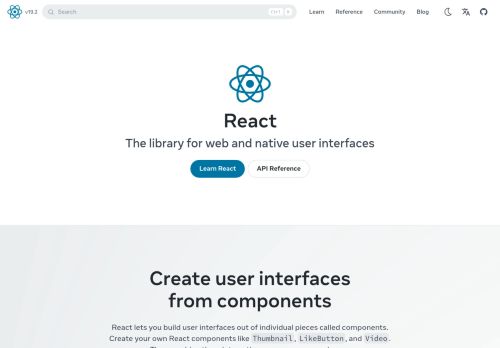

Your mail setup has problems.
react.dev fails 1 mail check: No DMARC record found. This is the kind of misconfiguration that sends your mail to spam.
Top Priorities (5)
Content-Security-Policy header is missing
Without a CSP, a single XSS bug can exfiltrate everything your users type — including credentials.
No Content-Security-Policy header found
Without a CSP, a single XSS bug can exfiltrate everything users type — credentials, payment data, session tokens.
19 image-only link(s) without alt text
Image-only links with no alt are unidentifiable to screen-reader users — link's destination is invisible.
9 link(s) with no accessible text
Links with no accessible text (empty <a></a>, image-only no alt, icon-only no aria-label) are unidentifiable to screen readers.
Cross-Origin-Embedder-Policy header is missing
COEP enforces that all embedded resources opt-in to cross-origin embedding — required for cross-origin isolation features.
Business case
What fixing the audit's findings is worth -- and what ignoring them keeps costing.
Return on investment
€680 investment → €10,902/month returns + EUR 500,000 risk avoided
Figures combine localized regulatory fine ceilings, search/conversion value priced against local CPC, and bandwidth waste estimates. Results depend on implementation quality and audience composition. Not legal or financial advice.
Conversion barriers
7 barrier(s) likely increasing bounce by ~30%.
- Page takes 7.1s to loadUsers abandon at ~3s — you're 4.6s over the 2.5s threshold→ Optimize render-blocking resources, preload the hero image, and compress images
- Page feels frozen for 668msClicks on the primary CTA are ignored while JavaScript runs→ Break up long tasks; defer non-critical JavaScript to post-hydration
- 21 broken link(s) on the pageClicks land on 404s — trust drops and the session often ends→ Fix or remove the broken destinations surfaced on the Content tab
- No Content-Security-Policy headerHigher XSS blast radius — one compromised script can exfiltrate the checkout form→ Ship a reporting-only CSP first, then enforce once violations are clean
- No structured dataNo rich-result eligibility in Google — lower SERP CTR vs competitors with stars and prices→ Add JSON-LD for your page type (Product, Article, FAQPage, LocalBusiness, …)
Preliminary CRO audit — each barrier links to the tab with detailed analysis.
Remediation cost
Start here for the best return on investment
Cost by category
Cost by effort level
Adjust assumptions
Team composition
Multiplier applied to dev hours to reflect QA, design, and PM overhead. Use Dev only for solo work; Full team for projects with formal review processes.
Rates reflect fully-loaded developer cost including overhead
Warning:Cost of inaction
Compliance Risk
€500.000
- Skip navigation link is missing (WCAG 2.4.1)EAA: EUR 1.000 – EUR 500.000
- Multiple H1 headings (2 found)EAA: EUR 1.000 – EUR 500.000
- Heading level skipped: H2 → H4 (missing H3)EAA: EUR 1.000 – EUR 500.000
Bounce-Rate Cost
€6.528 /mo
+29.7pp bounce · ~2,967 lost visitors/mo
CPC: EUR 2.20
Bandwidth Waste
€0,25 /mo
3406.2 MB/mo × 0.074 EUR/GB
- Optimize transfer: save ~341 KB per page loadSaves €0,25/mo
Compliance figures represent the statutory maximum fine for the most severe triggered category, capped per regulation — not the sum of per-finding penalties. Based on published regulatory fine ranges. This is not legal advice.
Unique monthly visitors from your analytics
Purchases, signups, or key actions
Optional — for revenue estimation
more engaged visitors from reduced bounce
Fix 4 critical issues to capture this value
How this is calculated
Based on Google/Deloitte research ("Milliseconds Make Millions") showing a ~7% bounce rate increase per additional second of LCP above the 2.5s "Good" threshold.
Your site's LCP: → estimated after fixes.
These are estimates based on industry research — actual results vary
Your data stays in your browser — nothing is sent to our servers
Lighthouse
Mobile
First Contentful Paint First Contentful Paint — how long until the browser renders the first piece of content. Under 1.8s is good.
1.27 s
Largest Contentful Paint Largest Contentful Paint — how long until the largest visible element loads. Under 2.5s is good.
7.10 s
Total Blocking Time Total Blocking Time — total time the main thread was blocked, preventing user input. Under 200ms is good.
668 ms
Cumulative Layout Shift Cumulative Layout Shift — measures visual stability. How much the page layout shifts during loading. Under 0.1 is good.
0.000
Speed Index Speed Index — how quickly content is visually displayed during load. Under 3.4s is good.
3.08 s
Time to Interactive Time to Interactive — how long until the page is fully interactive and responds to user input. Under 3.8s is good.
7.13 s
Desktop
First Contentful Paint First Contentful Paint — how long until the browser renders the first piece of content. Under 1.8s is good.
354 ms
Largest Contentful Paint Largest Contentful Paint — how long until the largest visible element loads. Under 2.5s is good.
819 ms
Total Blocking Time Total Blocking Time — total time the main thread was blocked, preventing user input. Under 200ms is good.
4 ms
Cumulative Layout Shift Cumulative Layout Shift — measures visual stability. How much the page layout shifts during loading. Under 0.1 is good.
0.000
Speed Index Speed Index — how quickly content is visually displayed during load. Under 3.4s is good.
588 ms
Time to Interactive Time to Interactive — how long until the page is fully interactive and responds to user input. Under 3.8s is good.
1.52 s
Categories
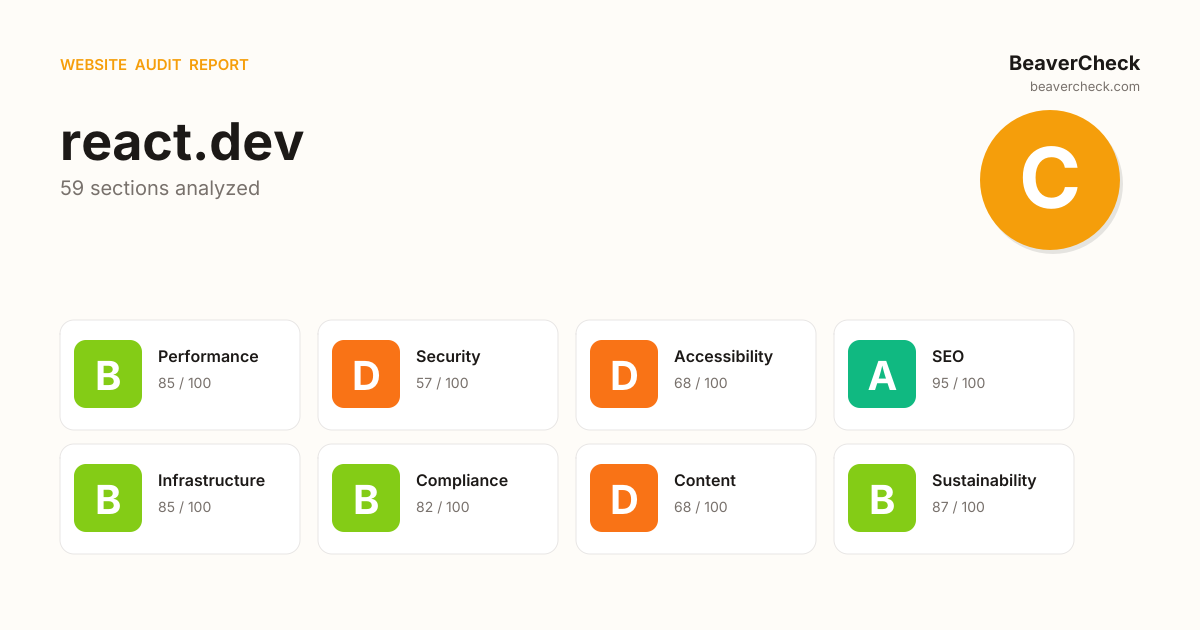
8Performance
All checks pass
Security
Content-Security-Policy header is missing
Accessibility
19 image-only link(s) without alt text
SEO
All checks pass
Infrastructure
All checks pass
Compliance
All checks pass
Content
All checks pass
Sustainability
All checks pass
How you compare
Where this site stands against peers running the same stack.
Technology stack
Algolia, hosted on Next.js, with Vercel Edge CDN
Stack Architecture
 Google Analytics
  Google Tag Manager
  Algolia
  Algolia DocSearch
  Cloudflare Google Search Console HSTS
  Open Graph
  RSS
RSS  React
React  Tailwind CSS
  Webpack
  Vercel Edge
  Next.js 15.1.12 Vercel
 All Detected Technologies (15)
Next.js is a React framework for developing single page Javascript applications.
Vercel is a cloud platform for static frontends and serverless functions.
Algolia offers a hosted web search product delivering real-time results.
Algolia DocSearch is a search widget specifically designed for documentation websites.
HTTP Strict Transport Security (HSTS) informs browsers that the site should only be accessed using HTTPS.
Open Graph is a protocol that is used to integrate any web page into the social graph.
RSS is a family of web feed formats used to publish frequently updated works—such as blog entries, news headlines, audio, and video—in a standardized format.
React is an open-source JavaScript library for building user interfaces or UI components.
Webpack is an open-source JavaScript module bundler.
Google Analytics is a free web analytics service that tracks and reports website traffic.
Google Tag Manager is a tag management system (TMS) that allows you to quickly and easily update measurement codes and related code fragments collectively known as tags on your website or mobile app.
Observations (2)
No build tool detected
A framework (Algolia) was detected but no bundler was identified. The build tool may not be detectable from output patterns, or the site may use the framework's built-in bundler.
Complex technology stack detected
15 technologies identified. A complex stack increases maintenance burden and attack surface. Consider whether all components are actively needed.
Show your score
Drop this badge on your README, marketing site, or status page. It auto-updates every time the audit re-runs and links back to this report.

This badge auto-updates with your latest scan result.
[](https://beavercheck.com/sites/react.dev)<a href="https://beavercheck.com/sites/react.dev"><img src="https://beavercheck.com/badge?url=https%3A%2F%2Freact.dev" alt="BeaverCheck Score"></a>https://beavercheck.com/badge?url=https%3A%2F%2Freact.devExport & share
Download the audit, share with your team, or grab a fix plan ready to copy into your tracker.
Copies markdown to clipboard
Fix Plan
Three-week roadmap to ship the audit's findings, with one-click copy targets for your tracker.
Three-week fix plan
2 sprints · 8h total → projected B (83)
Sprint 1: Quick Wins
+3Highest ROI — low effort, high impact
- · 19 image-only link(s) without alt text
- · 9 link(s) with no accessible text
Sprint 2: Core Fixes
+5Medium effort, high structural impact
- · Content-Security-Policy header is missing
- · No Content-Security-Policy header found
- · Cross-Origin-Embedder-Policy header is missing