Skip to content
Audit Complete

Results for https://craigslist.org

Visit site
Spain Spain · Madrid Completed: Apr 8, 2026 08:51 UTC

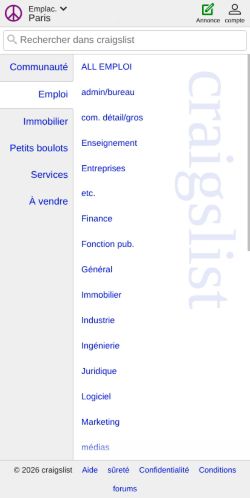
Mobile 375 × 812

Screenshot of the audited page (Mobile 375×812)

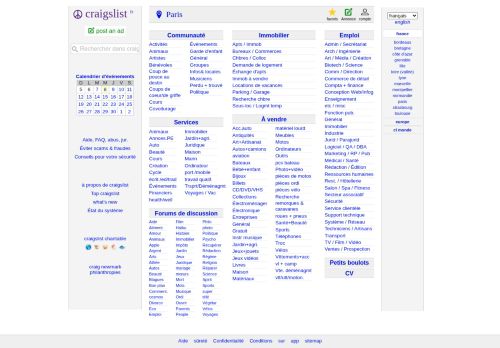
Desktop 1440 × 900

Screenshot of the audited page (Desktop 1440×900)
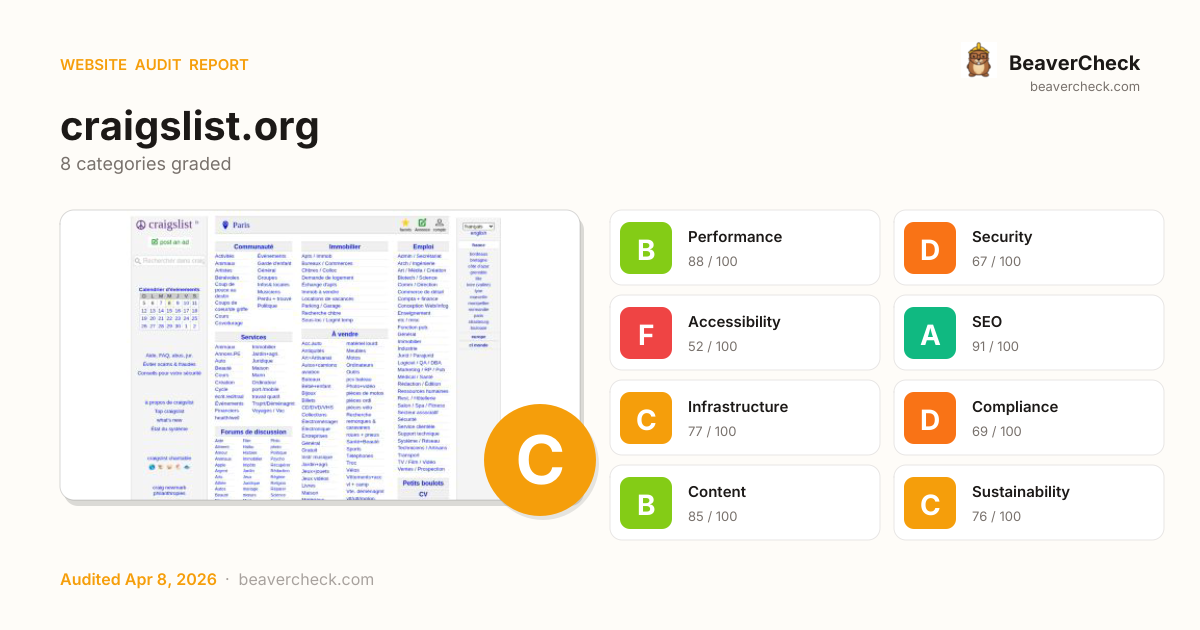
C75

Site Health

Score: 75 / 100

Based on 8 categories, 0 sections

How is this calculated?

The overall score is a weighted average of individual category scores. Categories with more impact on user experience and security carry more weight.

Performance 25%Security 25%Accessibility 15%SEO 10%Infrastructure 10%Compliance 8%Content 5%Sustainability 2%

Weights reflect general web best practices. Individual needs may differ.

Top Priorities (5)

1

Content-Security-Policy header is missing

Security › Security Headers
2

No Content-Security-Policy header found

Security › Content Security Policy
3

1 control(s) without accessible label

Accessibility › Form Accessibility
4

2 button(s) with no accessible text

Accessibility › Link & Button Quality
5

2 link(s) with no accessible text

Accessibility › Link & Button Quality
BeaverCheck badge
Embed this badge
[![BeaverCheck](https://beavercheck.com/badge?url=https%3A%2F%2Fcraigslist.org)](https://beavercheck.com/results/c7ceb044-bee0-8626-5e83-ff3d56a25308)
<a href="https://beavercheck.com/results/c7ceb044-bee0-8626-5e83-ff3d56a25308"><img src="https://beavercheck.com/badge?url=https%3A%2F%2Fcraigslist.org" alt="BeaverCheck Score"></a>
https://beavercheck.com/badge?url=https%3A%2F%2Fcraigslist.org

This badge auto-updates with your latest scan result.

Was this report useful?

Thanks for your feedback!

Lighthouse Scores

Industry-standard audits powered by Google Lighthouse.

35
Performance Overall performance score (0–100) based on Core Web Vitals and other metrics. 90+ is good.
85
Accessibility Measures how accessible the page is for users with disabilities. Checks color contrast, ARIA labels, and semantic HTML.
100
Best Practices Checks for modern web development best practices including HTTPS, no console errors, and secure JavaScript.
100
SEO Measures basic SEO optimizations: meta tags, crawlability, link text, and mobile friendliness.

Core Web Vitals

Key metrics that affect user experience.

First Contentful Paint First Contentful Paint — how long until the browser renders the first piece of content. Under 1.8s is good.

3.19 s

Largest Contentful Paint Largest Contentful Paint — how long until the largest visible element loads. Under 2.5s is good.

7.83 s

Total Blocking Time Total Blocking Time — total time the main thread was blocked, preventing user input. Under 200ms is good.

522 ms

Cumulative Layout Shift Cumulative Layout Shift — measures visual stability. How much the page layout shifts during loading. Under 0.1 is good.

0.255

Speed Index Speed Index — how quickly content is visually displayed during load. Under 3.4s is good.

9.06 s

Time to Interactive Time to Interactive — how long until the page is fully interactive and responds to user input. Under 3.8s is good.

7.83 s

Detailed Report

Audit breakdown by category with detailed findings.

35

Performance

Insights

Remove large, duplicate JavaScript modules from bundles to reduce unnecessary bytes consumed by network activity.

Polyfills and transforms enable older browsers to use new JavaScript features. However, many aren't necessary for modern browsers. Consider modifying your JavaScript build process to not transpile Baseline features, unless you know you must support older browsers. Learn why most sites can deploy ES6+ code without transpiling

3rd party code can significantly impact load performance. Reduce and defer loading of 3rd party code to prioritize your page's content.

Layout shifts occur when elements move absent any user interaction. Investigate the causes of layout shifts, such as elements being added, removed, or their fonts changing as the page loads.

headings: [map[key:node label:Element subItemsHeading:map[key:extra] valueType:node] map[granularity:0.001 key:score label:Layout shift score subItemsHeading:map[key:cause valueType:text] valueType:numeric]]
items: [map[node:map[type:text value:Total] score:0.25464] map[node:map[boundingRect:map[bottom:0 height:0 left:0 right:0 top:0 width:0] lhId:page-1-DIV nodeLabel: craigslist fr post an ad  Calen… path:1,HTML,1,BODY,3,SECTION,0,DIV,4,DIV selector:body.homepage > section.page-container > div.homepage-content > div#leftbar snippet:<div id="leftbar" class="leftbar"> type:node] score:0.25464]]

Your first network request is the most important. Reduce its latency by avoiding redirects, ensuring a fast server response, and enabling text compression.

Each subpart has specific improvement strategies. Ideally, most of the LCP time should be spent on loading the resources, not within delays.

headings: [map[key:label label:Subpart valueType:text] map[key:duration label:Duration valueType:ms]]
items: [map[duration:1195.622 label:Time to first byte subpart:timeToFirstByte] map[duration:3824.518 label:Element render delay subpart:elementRenderDelay]]
lhId: page-0-DIV
nodeLabel: craigslist
path: 1,HTML,1,BODY,0,DIV,3,DIV
selector: body.homepage > div.cl-mobile-homepage > div.watermark
snippet: <div class="watermark" style="top: 114px;">

Avoid chaining critical requests by reducing the length of chains, reducing the download size of resources, or deferring the download of unnecessary resources to improve page load.

description: [preconnect](https://developer.chrome.com/docs/lighthouse/performance/uses-rel-preconnect/) hints help the browser establish a connection earlier in the page load, saving time when the first request for that origin is made. The following are the origins that the page preconnected to.
title: Preconnected origins
value: no origins were preconnected
description: Add [preconnect](https://developer.chrome.com/docs/lighthouse/performance/uses-rel-preconnect/) hints to your most important origins, but try to use no more than 4.
title: Preconnect candidates

Requests are blocking the page's initial render, which may delay LCP. Deferring or inlining can move these network requests out of the critical path.

A long cache lifetime can speed up repeat visits to your page. Learn more about caching.

RequestCache TTLTransfer Size
www.craigslist.org/images/cl_logo-vert.png86400.0 s21.0 KiB

These insights are also available in the Chrome DevTools Performance Panel - record a trace to view more detailed information.

Redirects introduce additional delays before the page can be loaded. Learn how to avoid page redirects.

Estimated savings: 2.3 s

These are the largest layout shifts observed on the page. Each table item represents a single layout shift, and shows the element that shifted the most. Below each item are possible root causes that led to the layout shift. Some of these layout shifts may not be included in the CLS metric value due to windowing. Learn how to improve CLS

ElementLayout shift score
craigslist fr post an ad  Calen… body.homepage > section.page-container > div.homepage-content > div#leftbar
0.255

The maximum potential First Input Delay that your users could experience is the duration of the longest task. Learn more about the Maximum Potential First Input Delay metric.

Time to Interactive is the amount of time it takes for the page to become fully interactive. Learn more about the Time to Interactive metric.

TTI

Diagnostics

Reduce unused rules from stylesheets and defer CSS not used for above-the-fold content to decrease bytes consumed by network activity. Learn how to reduce unused CSS.

Estimated savings: 150 ms 65.9 KiB
URLTransfer SizeEst Savings
/static/www/homePage-2026-04-07-10-38-662819477dce05316b7...69.0 KiB65.9 KiB

Reduce unused JavaScript and defer loading scripts until they are required to decrease bytes consumed by network activity. Learn how to reduce unused JavaScript.

Estimated savings: 1.4 s 277.8 KiB
URLTransfer SizeEst Savings
/static/www/browsePostings-2026-04-07-10-38-0fd1d88a29dc5...603.3 KiB277.8 KiB

More information about the performance of your application. These numbers don't directly affect the Performance score.

Optimize DOM size
Font display
Forced reflow
Improve image delivery
Optimize viewport for mobile
Minify CSS
Minify JavaScript
Avoids enormous network payloads Total size was 754 KiB
JavaScript execution time 1.1 s
Minimizes main-thread work 1.7 s
Avoid long main-thread tasks 3 long tasks found
Image elements have explicit `width` and `height`
Page didn't prevent back/forward cache restoration
Network Requests
Network Round Trip Times 90 ms
Server Backend Latencies 10 ms
Tasks
Diagnostics
Metrics
Screenshot Thumbnails
Final Screenshot
Script Treemap Data
Resources Summary
Initial server response time was short Root document took 100 ms
INP breakdown
LCP request discovery
User Timing marks and measures
Avoid non-composited animations
85

Accessibility

These checks highlight opportunities to improve the accessibility of your web app. Automatic detection can only detect a subset of issues and does not guarantee the accessibility of your web app, so manual testing is also encouraged.

Internationalization and localization

If a page doesn't specify a `lang` attribute, a screen reader assumes that the page is in the default language that the user chose when setting up the screen reader. If the page isn't actually in the default language, then the screen reader might not announce the page's text correctly. Learn more about the `lang` attribute.

Failing Elements
html.cl-has-touch html.cl-has-touch

These are opportunities to improve the interpretation of your content by users in different locales.

Names and labels

Link text (and alternate text for images, when used as links) that is discernible, unique, and focusable improves the navigation experience for screen reader users. Learn how to make links accessible.

Failing Elements
div.cl-mobile-homepage > header.cl-header-ng > div.cl-left-group > a.cl-app-anchor div.cl-mobile-homepage > header.cl-header-ng > div.cl-left-group > a.cl-app-anchor

These are opportunities to improve the semantics of the controls in your application. This may enhance the experience for users of assistive technology, like a screen reader.

Interactive controls are keyboard focusable
Interactive elements indicate their purpose and state
The page has a logical tab order
Visual order on the page follows DOM order
User focus is not accidentally trapped in a region
The user's focus is directed to new content added to the page
HTML5 landmark elements are used to improve navigation
Offscreen content is hidden from assistive technology
Custom controls have associated labels
Custom controls have ARIA roles
`[aria-hidden="true"]` is not present on the document `<body>`
Buttons have an accessible name
Form elements have associated labels
`[user-scalable="no"]` is not used in the `<meta name="viewport">` element and the `[maximum-scale]` attribute is not less than 5.
`[aria-hidden="true"]` elements do not contain focusable descendents
Background and foreground colors have a sufficient contrast ratio
Document has a `<title>` element
No element has a `[tabindex]` value greater than 0
Touch targets have sufficient size and spacing.
Document has a main landmark.
The page contains a heading, skip link, or landmark region
`[accesskey]` values are unique
`[aria-*]` attributes match their roles
`button`, `link`, and `menuitem` elements have accessible names
ARIA attributes are used as specified for the element's role
Deprecated ARIA roles were not used
Elements with `role="dialog"` or `role="alertdialog"` have accessible names.
ARIA input fields have accessible names
ARIA `meter` elements have accessible names
ARIA `progressbar` elements have accessible names
Elements use only permitted ARIA attributes
`[role]`s have all required `[aria-*]` attributes
Elements with an ARIA `[role]` that require children to contain a specific `[role]` have all required children.
`[role]`s are contained by their required parent element
`[role]` values are valid
Elements with the `role=text` attribute do not have focusable descendents.
ARIA toggle fields have accessible names
ARIA `tooltip` elements have accessible names
ARIA `treeitem` elements have accessible names
`[aria-*]` attributes have valid values
`[aria-*]` attributes are valid and not misspelled
`<dl>`'s contain only properly-ordered `<dt>` and `<dd>` groups, `<script>`, `<template>` or `<div>` elements.
Definition list items are wrapped in `<dl>` elements
ARIA IDs are unique
No form fields have multiple labels
`<frame>` or `<iframe>` elements have a title
Heading elements appear in a sequentially-descending order
`<html>` element has a valid value for its `[lang]` attribute
`<html>` element has an `[xml:lang]` attribute with the same base language as the `[lang]` attribute.
Image elements have `[alt]` attributes
Input buttons have discernible text.
`<input type="image">` elements have `[alt]` text
Links are distinguishable without relying on color.
Lists contain only `<li>` elements and script supporting elements (`<script>` and `<template>`).
List items (`<li>`) are contained within `<ul>`, `<ol>` or `<menu>` parent elements
The document does not use `<meta http-equiv="refresh">`
`<object>` elements have alternate text
Select elements have associated label elements.
Skip links are focusable.
Cells in a `<table>` element that use the `[headers]` attribute refer to table cells within the same table.
`<th>` elements and elements with `[role="columnheader"/"rowheader"]` have data cells they describe.
`[lang]` attributes have a valid value
`<video>` elements contain a `<track>` element with `[kind="captions"]`
Tables have different content in the summary attribute and `<caption>`.
All heading elements contain content.
Uses ARIA roles only on compatible elements
Image elements do not have `[alt]` attributes that are redundant text.
Identical links have the same purpose.
Elements with visible text labels have matching accessible names.
Tables use `<caption>` instead of cells with the `[colspan]` attribute to indicate a caption.
`<td>` elements in a large `<table>` have one or more table headers.
100

Best Practices

General

Source maps translate minified code to the original source code. This helps developers debug in production. In addition, Lighthouse is able to provide further insights. Consider deploying source maps to take advantage of these benefits. Learn more about source maps.

Uses HTTPS
Avoids deprecated APIs
Avoids third-party cookies
Allows users to paste into input fields
Avoids requesting the geolocation permission on page load
Avoids requesting the notification permission on page load
Displays images with correct aspect ratio
Serves images with appropriate resolution
Page has the HTML doctype
Properly defines charset
No browser errors logged to the console
No issues in the `Issues` panel in Chrome Devtools
Ensure CSP is effective against XSS attacks
Use a strong HSTS policy
Ensure proper origin isolation with COOP
Mitigate DOM-based XSS with Trusted Types
Detected JavaScript libraries
Redirects HTTP traffic to HTTPS
Mitigate clickjacking with XFO or CSP
100

SEO

These checks ensure that your page is following basic search engine optimization advice. There are many additional factors Lighthouse does not score here that may affect your search ranking, including performance on Core Web Vitals. Learn more about Google Search Essentials.

Structured data is valid
Page isn’t blocked from indexing
Document has a `<title>` element
Document has a meta description
Page has successful HTTP status code
Links have descriptive text
Links are crawlable
robots.txt is valid
Document has a valid `hreflang`
Document has a valid `rel=canonical`
Image elements have `[alt]` attributes

Lighthouse Scores

Industry-standard audits powered by Google Lighthouse. — Desktop

66
Performance Overall performance score (0–100) based on Core Web Vitals and other metrics. 90+ is good.
72
Accessibility Measures how accessible the page is for users with disabilities. Checks color contrast, ARIA labels, and semantic HTML.
100
Best Practices Checks for modern web development best practices including HTTPS, no console errors, and secure JavaScript.
100
SEO Measures basic SEO optimizations: meta tags, crawlability, link text, and mobile friendliness.

Core Web Vitals

Key metrics that affect user experience. — Desktop

First Contentful Paint First Contentful Paint — how long until the browser renders the first piece of content. Under 1.8s is good.

884 ms

Largest Contentful Paint Largest Contentful Paint — how long until the largest visible element loads. Under 2.5s is good.

884 ms

Total Blocking Time Total Blocking Time — total time the main thread was blocked, preventing user input. Under 200ms is good.

94 ms

Cumulative Layout Shift Cumulative Layout Shift — measures visual stability. How much the page layout shifts during loading. Under 0.1 is good.

1.160

Speed Index Speed Index — how quickly content is visually displayed during load. Under 3.4s is good.

2.95 s

Time to Interactive Time to Interactive — how long until the page is fully interactive and responds to user input. Under 3.8s is good.

1.58 s

Detailed Report

Audit breakdown by category with detailed findings.

66

Performance

Insights

Remove large, duplicate JavaScript modules from bundles to reduce unnecessary bytes consumed by network activity.

Polyfills and transforms enable older browsers to use new JavaScript features. However, many aren't necessary for modern browsers. Consider modifying your JavaScript build process to not transpile Baseline features, unless you know you must support older browsers. Learn why most sites can deploy ES6+ code without transpiling

3rd party code can significantly impact load performance. Reduce and defer loading of 3rd party code to prioritize your page's content.

Layout shifts occur when elements move absent any user interaction. Investigate the causes of layout shifts, such as elements being added, removed, or their fonts changing as the page loads.

headings: [map[key:node label:Element subItemsHeading:map[key:extra] valueType:node] map[granularity:0.001 key:score label:Layout shift score subItemsHeading:map[key:cause valueType:text] valueType:numeric]]
items: [map[node:map[type:text value:Total] score:1.16032] map[node:map[boundingRect:map[bottom:961 height:961 left:0 right:1350 top:0 width:1350] lhId:page-3-SECTION nodeLabel:Paris favoris Annonce compte craigslist fr post an ad  Calendrier d'événements… path:1,HTML,1,BODY,2,SECTION selector:body.homepage > section.page-container snippet:<section class="page-container flexed-footer" style=""> type:node] score:1] map[node:map[boundingRect:map[bottom:836 height:820 left:185 right:383 top:16 width:198] lhId:page-1-DIV nodeLabel:craigslist fr post an ad  Calendrier d'événements D L M M J V S 5 6 7 8 9 10 1… path:1,HTML,1,BODY,2,SECTION,0,DIV,4,DIV selector:body.homepage > section.page-container > div.homepage-content > div#leftbar snippet:<div id="leftbar" class="leftbar"> type:node] score:0.16032]]

Your first network request is the most important. Reduce its latency by avoiding redirects, ensuring a fast server response, and enabling text compression.

Avoid chaining critical requests by reducing the length of chains, reducing the download size of resources, or deferring the download of unnecessary resources to improve page load.

description: [preconnect](https://developer.chrome.com/docs/lighthouse/performance/uses-rel-preconnect/) hints help the browser establish a connection earlier in the page load, saving time when the first request for that origin is made. The following are the origins that the page preconnected to.
title: Preconnected origins
value: no origins were preconnected
description: Add [preconnect](https://developer.chrome.com/docs/lighthouse/performance/uses-rel-preconnect/) hints to your most important origins, but try to use no more than 4.
title: Preconnect candidates
value: No additional origins are good candidates for preconnecting

Requests are blocking the page's initial render, which may delay LCP. Deferring or inlining can move these network requests out of the critical path.

These insights are also available in the Chrome DevTools Performance Panel - record a trace to view more detailed information.

Redirects introduce additional delays before the page can be loaded. Learn how to avoid page redirects.

Estimated savings: 628 ms

These are the largest layout shifts observed on the page. Each table item represents a single layout shift, and shows the element that shifted the most. Below each item are possible root causes that led to the layout shift. Some of these layout shifts may not be included in the CLS metric value due to windowing. Learn how to improve CLS

ElementLayout shift score
Paris favoris Annonce compte craigslist fr post an ad  Calendrier d'événements… body.homepage > section.page-container
1.000
craigslist fr post an ad  Calendrier d'événements D L M M J V S 5 6 7 8 9 10 1… body.homepage > section.page-container > div.homepage-content > div#leftbar
0.160

The maximum potential First Input Delay that your users could experience is the duration of the longest task. Learn more about the Maximum Potential First Input Delay metric.

Diagnostics

Reduce unused rules from stylesheets and defer CSS not used for above-the-fold content to decrease bytes consumed by network activity. Learn how to reduce unused CSS.

Estimated savings: 0.0 ms 66.6 KiB
URLTransfer SizeEst Savings
/static/www/homePage-2026-04-07-10-38-662819477dce05316b7...69.0 KiB66.6 KiB

Reduce unused JavaScript and defer loading scripts until they are required to decrease bytes consumed by network activity. Learn how to reduce unused JavaScript.

Estimated savings: 0.0 ms 286.1 KiB
URLTransfer SizeEst Savings
/static/www/browsePostings-2026-04-07-10-38-0fd1d88a29dc5...603.3 KiB286.1 KiB

More information about the performance of your application. These numbers don't directly affect the Performance score.

Time to Interactive 1.6 s
Use efficient cache lifetimes
Optimize DOM size
Font display
Forced reflow
Improve image delivery
LCP breakdown
Modern HTTP
Optimize viewport for mobile
Minify CSS
Minify JavaScript
Avoids enormous network payloads Total size was 733 KiB
JavaScript execution time 0.3 s
Minimizes main-thread work 0.5 s
Avoid long main-thread tasks 1 long task found
Image elements have explicit `width` and `height`
Page didn't prevent back/forward cache restoration
Network Requests
Network Round Trip Times 90 ms
Server Backend Latencies 10 ms
Tasks
Diagnostics
Metrics
Screenshot Thumbnails
Final Screenshot
Script Treemap Data
Resources Summary
Initial server response time was short Root document took 100 ms
INP breakdown
LCP request discovery
User Timing marks and measures
Avoid non-composited animations
72

Accessibility

These checks highlight opportunities to improve the accessibility of your web app. Automatic detection can only detect a subset of issues and does not guarantee the accessibility of your web app, so manual testing is also encouraged.

Contrast

Low-contrast text is difficult or impossible for many users to read. Learn how to provide sufficient color contrast.

Failing Elements
post an ad div#leftbar > ul#postlks > li > a#post

These are opportunities to improve the legibility of your content.

Navigation

Properly ordered headings that do not skip levels convey the semantic structure of the page, making it easier to navigate and understand when using assistive technologies. Learn more about heading order.

Failing Elements
Calendrier d'événements div.homepage-content > div#leftbar > div > h4#calban
france div#rightbar > ul.menu > li.expand > h5.ban

These are opportunities to improve keyboard navigation in your application.

Internationalization and localization

If a page doesn't specify a `lang` attribute, a screen reader assumes that the page is in the default language that the user chose when setting up the screen reader. If the page isn't actually in the default language, then the screen reader might not announce the page's text correctly. Learn more about the `lang` attribute.

Failing Elements
html.bd-can-hover html.bd-can-hover

These are opportunities to improve the interpretation of your content by users in different locales.

Names and labels

Form elements without effective labels can create frustrating experiences for screen reader users. Learn more about the `select` element.

Failing Elements
dansk deutsch english español français italiano português suomi svenska tiếng v… div.homepage-content > div#rightbar > div#langlinks > select#chlang

These are opportunities to improve the semantics of the controls in your application. This may enhance the experience for users of assistive technology, like a screen reader.

Best practices

Touch targets with sufficient size and spacing help users who may have difficulty targeting small controls to activate the targets. Learn more about touch targets.

Failing Elements
7 tbody > tr > td > a
8 tbody > tr > td.today > a
9 tbody > tr > td > a
10 tbody > tr > td > a
11 tbody > tr > td > a
12 tbody > tr > td > a
13 tbody > tr > td > a
14 tbody > tr > td > a
15 tbody > tr > td > a
16 tbody > tr > td > a
17 tbody > tr > td > a
18 tbody > tr > td > a
19 tbody > tr > td > a
20 tbody > tr > td > a
21 tbody > tr > td > a
22 tbody > tr > td > a
23 tbody > tr > td > a
24 tbody > tr > td > a
25 tbody > tr > td > a
26 tbody > tr > td > a
27 tbody > tr > td > a
28 tbody > tr > td > a
29 tbody > tr > td > a
30 tbody > tr > td > a
1 tbody > tr > td > a
2 tbody > tr > td > a
Aide, FAQ, abus, jur. div#leftbar > ul#user_resources > li > a
Éviter scams & fraudes div#leftbar > ul#user_resources > li > a
Conseils pour votre sécurité div#leftbar > ul#user_resources > li > a
à propos de craigslist div#leftbar > ul#about_craigslist > li > a
Top craigslist div#leftbar > ul#about_craigslist > li > a
what's new div#leftbar > ul#about_craigslist > li > a
État du système div#leftbar > ul#about_craigslist > li > a
craigslist charitable div#leftbar > ul#about_craigslist > li > a
Activités div.cats > ul#ccc0 > li > a.act
Animaux div.cats > ul#ccc0 > li > a.pet
Artistes div.cats > ul#ccc0 > li > a.ats
Bénévoles div.cats > ul#ccc0 > li > a.vol
Cours div.cats > ul#ccc0 > li > a.cls
Covoiturage div.cats > ul#ccc0 > li > a.rid
Événements div.cats > ul#ccc1 > li > a.eve
Garde d'enfant div.cats > ul#ccc1 > li > a.kid
Général div.cats > ul#ccc1 > li > a.com
Groupes div.cats > ul#ccc1 > li > a.grp
Infos& locales div.cats > ul#ccc1 > li > a.vnn
Musiciens div.cats > ul#ccc1 > li > a.muc
Perdu + trouvé div.cats > ul#ccc1 > li > a.laf
Politique div.cats > ul#ccc1 > li > a.pol
Animaux div.cats > ul#bbb0 > li > a.pas
Annces.PE div.cats > ul#bbb0 > li > a.biz
Auto div.cats > ul#bbb0 > li > a.aos
Beauté div.cats > ul#bbb0 > li > a.bts
Cours div.cats > ul#bbb0 > li > a.lss
Création div.cats > ul#bbb0 > li > a.crs
Cycle div.cats > ul#bbb0 > li > a.cys
écrit./ed/trad div.cats > ul#bbb0 > li > a.wet
Événements div.cats > ul#bbb0 > li > a.evs
Financiers div.cats > ul#bbb0 > li > a.fns
health/well div.cats > ul#bbb0 > li > a.hws
Immobilier div.cats > ul#bbb1 > li > a.rts
Jardin+agri. div.cats > ul#bbb1 > li > a.fgs
Juridique div.cats > ul#bbb1 > li > a.lgs
Maison div.cats > ul#bbb1 > li > a.hss
Marin div.cats > ul#bbb1 > li > a.mas
Ordinateur div.cats > ul#bbb1 > li > a.cps
port./mobile div.cats > ul#bbb1 > li > a.cms
travail qualif. div.cats > ul#bbb1 > li > a.sks
Voyages / Vac div.cats > ul#bbb1 > li > a.trv
Aide div.cats > ul#forums0 > li > a
Aliment. div.cats > ul#forums0 > li > a
Amour div.cats > ul#forums0 > li > a
Animaux div.cats > ul#forums0 > li > a
Apple div.cats > ul#forums0 > li > a
Argent div.cats > ul#forums0 > li > a
Arts div.cats > ul#forums0 > li > a
Athée div.cats > ul#forums0 > li > a
Autos div.cats > ul#forums0 > li > a
Beauté div.cats > ul#forums0 > li > a
Blagues div.cats > ul#forums0 > li > a
Bon plan div.cats > ul#forums0 > li > a
cosmos div.cats > ul#forums0 > li > a
Divorce div.cats > ul#forums0 > li > a
Éco div.cats > ul#forums0 > li > a
Emploi div.cats > ul#forums0 > li > a
Film div.cats > ul#forums1 > li > a
Haïku div.cats > ul#forums1 > li > a
Histoire div.cats > ul#forums1 > li > a
Impôts div.cats > ul#forums1 > li > a
Jardin div.cats > ul#forums1 > li > a
Jeux div.cats > ul#forums1 > li > a
Juridique div.cats > ul#forums1 > li > a
mariage div.cats > ul#forums1 > li > a
mœurs div.cats > ul#forums1 > li > a
Mort div.cats > ul#forums1 > li > a
Mots div.cats > ul#forums1 > li > a
Musique div.cats > ul#forums1 > li > a
Ordi div.cats > ul#forums1 > li > a
Ouvrir div.cats > ul#forums1 > li > a
Parents div.cats > ul#forums1 > li > a
People div.cats > ul#forums1 > li > a
Philo div.cats > ul#forums2 > li > a
photo div.cats > ul#forums2 > li > a
Politique div.cats > ul#forums2 > li > a
Psycho div.cats > ul#forums2 > li > a
Rédaction div.cats > ul#forums2 > li > a
Régime div.cats > ul#forums2 > li > a
Religion div.cats > ul#forums2 > li > a
Réparer div.cats > ul#forums2 > li > a
Science div.cats > ul#forums2 > li > a
Spirit div.cats > ul#forums2 > li > a
Sports div.cats > ul#forums2 > li > a
super div.cats > ul#forums2 > li > a
télé div.cats > ul#forums2 > li > a
Végétar div.cats > ul#forums2 > li > a
Vélos div.cats > ul#forums2 > li > a
Voyages div.cats > ul#forums2 > li > a
Apts / Immob div.cats > ul#hhh0 > li > a.apa
Bureaux / Commerces div.cats > ul#hhh0 > li > a.off
Chbres / Colloc div.cats > ul#hhh0 > li > a.roo
Demande de logement div.cats > ul#hhh0 > li > a.hsw
Échange d'apts div.cats > ul#hhh0 > li > a.swp
Immob à vendre div.cats > ul#hhh0 > li > a.rea
Locations de vacances div.cats > ul#hhh0 > li > a.vac
Parking / Garage div.cats > ul#hhh0 > li > a.prk
Recherche chbre div.cats > ul#hhh0 > li > a.sha
Sous-loc / Logmt temp div.cats > ul#hhh0 > li > a.sub
Acc.auto div.cats > ul#sss0 > li > a.pta
Antiquités div.cats > ul#sss0 > li > a.ata
Art+Artisanat div.cats > ul#sss0 > li > a.ara
Autos+camions div.cats > ul#sss0 > li > a.cta
aviation div.cats > ul#sss0 > li > a.ava
Bateaux div.cats > ul#sss0 > li > a.boo
Bébé+enfant div.cats > ul#sss0 > li > a.baa
Bijoux div.cats > ul#sss0 > li > a.jwa
Billets div.cats > ul#sss0 > li > a.tia
CD/DVD/VHS div.cats > ul#sss0 > li > a.ema
Collections div.cats > ul#sss0 > li > a.cba
Électroménager div.cats > ul#sss0 > li > a.ppa
Électronique div.cats > ul#sss0 > li > a.ela
Entreprises div.cats > ul#sss0 > li > a.bfa
Général div.cats > ul#sss0 > li > a.foa
Gratuit div.cats > ul#sss0 > li > a.zip
Instr musique div.cats > ul#sss0 > li > a.msa
Jardin+agri. div.cats > ul#sss0 > li > a.gra
Jeux+jouets div.cats > ul#sss0 > li > a.taa
Jeux vidéos div.cats > ul#sss0 > li > a.vga
Livres div.cats > ul#sss0 > li > a.bka
Maison div.cats > ul#sss0 > li > a.hsa
Matériaux div.cats > ul#sss0 > li > a.maa
matériel lourd div.cats > ul#sss1 > li > a.hva
Meubles div.cats > ul#sss1 > li > a.fua
Motos div.cats > ul#sss1 > li > a.mca
Ordinateurs div.cats > ul#sss1 > li > a.sya
Outils div.cats > ul#sss1 > li > a.tla
pcs bateau div.cats > ul#sss1 > li > a.bpa
Photo+vidéo div.cats > ul#sss1 > li > a.pha
pièces de motos div.cats > ul#sss1 > li > a.mpa
pièces ordi div.cats > ul#sss1 > li > a.syp
pièces vélo div.cats > ul#sss1 > li > a.bip
Recherche div.cats > ul#sss1 > li > a.waa
roues + pneus div.cats > ul#sss1 > li > a.wta
Santé+Beauté div.cats > ul#sss1 > li > a.haa
Sports div.cats > ul#sss1 > li > a.sga
Téléphones div.cats > ul#sss1 > li > a.moa
Troc div.cats > ul#sss1 > li > a.bar
Vélos div.cats > ul#sss1 > li > a.bia
Vêtements+acc div.cats > ul#sss1 > li > a.cla
vl + camp div.cats > ul#sss1 > li > a.rva
Vte. déménagmt div.cats > ul#sss1 > li > a.gms
vtt/utt/moton. div.cats > ul#sss1 > li > a.sna
Admin / Secrétariat div.cats > ul#jjj0 > li > a.ofc
Arch / Ingénierie div.cats > ul#jjj0 > li > a.egr
Art / Média / Création div.cats > ul#jjj0 > li > a.med
Biotech / Science div.cats > ul#jjj0 > li > a.sci
Comm / Direction div.cats > ul#jjj0 > li > a.bus
Commerce de détail div.cats > ul#jjj0 > li > a.ret
Compta + finance div.cats > ul#jjj0 > li > a.acc
Conception Web/Infog div.cats > ul#jjj0 > li > a.web
Enseignement div.cats > ul#jjj0 > li > a.edu
etc / misc div.cats > ul#jjj0 > li > a.etc
Fonction pub. div.cats > ul#jjj0 > li > a.gov
Général div.cats > ul#jjj0 > li > a.lab
Immobilier div.cats > ul#jjj0 > li > a.rej
Industrie div.cats > ul#jjj0 > li > a.mnu
Jurid / Parajurid div.cats > ul#jjj0 > li > a.lgl
Logiciel / QA / DBA div.cats > ul#jjj0 > li > a.sof
Marketing / RP / Pub div.cats > ul#jjj0 > li > a.mar
Médical / Santé div.cats > ul#jjj0 > li > a.hea
Rédaction / Édition div.cats > ul#jjj0 > li > a.wri
Ressources humaines div.cats > ul#jjj0 > li > a.hum
Rest. / Hôtellerie div.cats > ul#jjj0 > li > a.fbh
Salon / Spa / Fitness div.cats > ul#jjj0 > li > a.spa
Secteur associatif div.cats > ul#jjj0 > li > a.npo
Sécurité div.cats > ul#jjj0 > li > a.sec
Service clientèle div.cats > ul#jjj0 > li > a.csr
Support technique div.cats > ul#jjj0 > li > a.tch
Système / Réseau div.cats > ul#jjj0 > li > a.sad
Techniciens / Artisans div.cats > ul#jjj0 > li > a.trd
Transport div.cats > ul#jjj0 > li > a.trp
TV / Film / Vidéo div.cats > ul#jjj0 > li > a.tfr
Ventes / Prospection div.cats > ul#jjj0 > li > a.sls
dansk deutsch english español français italiano português suomi svenska tiếng v… div.homepage-content > div#rightbar > div#langlinks > select#chlang
english div.homepage-content > div#rightbar > div#langlinks > a
bordeaux li.expand > ul.acitem > li.s > a
bretagne li.expand > ul.acitem > li.s > a
côte d'azur li.expand > ul.acitem > li.s > a
grenoble li.expand > ul.acitem > li.s > a
lille li.expand > ul.acitem > li.s > a
loire (vallée) li.expand > ul.acitem > li.s > a
lyon li.expand > ul.acitem > li.s > a
marseille li.expand > ul.acitem > li.s > a
montpellier li.expand > ul.acitem > li.s > a
normandie li.expand > ul.acitem > li.s > a
paris li.expand > ul.acitem > li.s > a
strasbourg li.expand > ul.acitem > li.s > a
toulouse li.expand > ul.acitem > li.s > a

One main landmark helps screen reader users navigate a web page. Learn more about landmarks.

Failing Elements
html.bd-can-hover html.bd-can-hover

These items highlight common accessibility best practices.

Interactive controls are keyboard focusable
Interactive elements indicate their purpose and state
The page has a logical tab order
Visual order on the page follows DOM order
User focus is not accidentally trapped in a region
The user's focus is directed to new content added to the page
HTML5 landmark elements are used to improve navigation
Offscreen content is hidden from assistive technology
Custom controls have associated labels
Custom controls have ARIA roles
`[aria-hidden="true"]` is not present on the document `<body>`
Buttons have an accessible name
Form elements have associated labels
`[user-scalable="no"]` is not used in the `<meta name="viewport">` element and the `[maximum-scale]` attribute is not less than 5.
`[aria-hidden="true"]` elements do not contain focusable descendents
Document has a `<title>` element
Links are distinguishable without relying on color.
Links have a discernible name
Lists contain only `<li>` elements and script supporting elements (`<script>` and `<template>`).
List items (`<li>`) are contained within `<ul>`, `<ol>` or `<menu>` parent elements
No element has a `[tabindex]` value greater than 0
Cells in a `<table>` element that use the `[headers]` attribute refer to table cells within the same table.
Identical links have the same purpose.
Tables use `<caption>` instead of cells with the `[colspan]` attribute to indicate a caption.
`<td>` elements in a large `<table>` have one or more table headers.
`[accesskey]` values are unique
`[aria-*]` attributes match their roles
`button`, `link`, and `menuitem` elements have accessible names
ARIA attributes are used as specified for the element's role
Deprecated ARIA roles were not used
Elements with `role="dialog"` or `role="alertdialog"` have accessible names.
ARIA input fields have accessible names
ARIA `meter` elements have accessible names
ARIA `progressbar` elements have accessible names
Elements use only permitted ARIA attributes
`[role]`s have all required `[aria-*]` attributes
Elements with an ARIA `[role]` that require children to contain a specific `[role]` have all required children.
`[role]`s are contained by their required parent element
`[role]` values are valid
Elements with the `role=text` attribute do not have focusable descendents.
ARIA toggle fields have accessible names
ARIA `tooltip` elements have accessible names
ARIA `treeitem` elements have accessible names
`[aria-*]` attributes have valid values
`[aria-*]` attributes are valid and not misspelled
The page contains a heading, skip link, or landmark region
`<dl>`'s contain only properly-ordered `<dt>` and `<dd>` groups, `<script>`, `<template>` or `<div>` elements.
Definition list items are wrapped in `<dl>` elements
ARIA IDs are unique
No form fields have multiple labels
`<frame>` or `<iframe>` elements have a title
`<html>` element has a valid value for its `[lang]` attribute
`<html>` element has an `[xml:lang]` attribute with the same base language as the `[lang]` attribute.
Image elements have `[alt]` attributes
Input buttons have discernible text.
`<input type="image">` elements have `[alt]` text
The document does not use `<meta http-equiv="refresh">`
`<object>` elements have alternate text
Skip links are focusable.
`<th>` elements and elements with `[role="columnheader"/"rowheader"]` have data cells they describe.
`[lang]` attributes have a valid value
`<video>` elements contain a `<track>` element with `[kind="captions"]`
Tables have different content in the summary attribute and `<caption>`.
All heading elements contain content.
Uses ARIA roles only on compatible elements
Image elements do not have `[alt]` attributes that are redundant text.
Elements with visible text labels have matching accessible names.
100

Best Practices

General

Source maps translate minified code to the original source code. This helps developers debug in production. In addition, Lighthouse is able to provide further insights. Consider deploying source maps to take advantage of these benefits. Learn more about source maps.

Uses HTTPS
Avoids deprecated APIs
Avoids third-party cookies
Allows users to paste into input fields
Avoids requesting the geolocation permission on page load
Avoids requesting the notification permission on page load
Displays images with correct aspect ratio
Serves images with appropriate resolution
Page has the HTML doctype
Properly defines charset
No browser errors logged to the console
No issues in the `Issues` panel in Chrome Devtools
Ensure CSP is effective against XSS attacks
Use a strong HSTS policy
Ensure proper origin isolation with COOP
Mitigate DOM-based XSS with Trusted Types
Detected JavaScript libraries
Redirects HTTP traffic to HTTPS
Mitigate clickjacking with XFO or CSP
100

SEO

These checks ensure that your page is following basic search engine optimization advice. There are many additional factors Lighthouse does not score here that may affect your search ranking, including performance on Core Web Vitals. Learn more about Google Search Essentials.

Structured data is valid
Page isn’t blocked from indexing
Document has a `<title>` element
Document has a meta description
Page has successful HTTP status code
Links have descriptive text
Links are crawlable
robots.txt is valid
Document has a valid `hreflang`
Document has a valid `rel=canonical`
Image elements have `[alt]` attributes

Send Feedback