

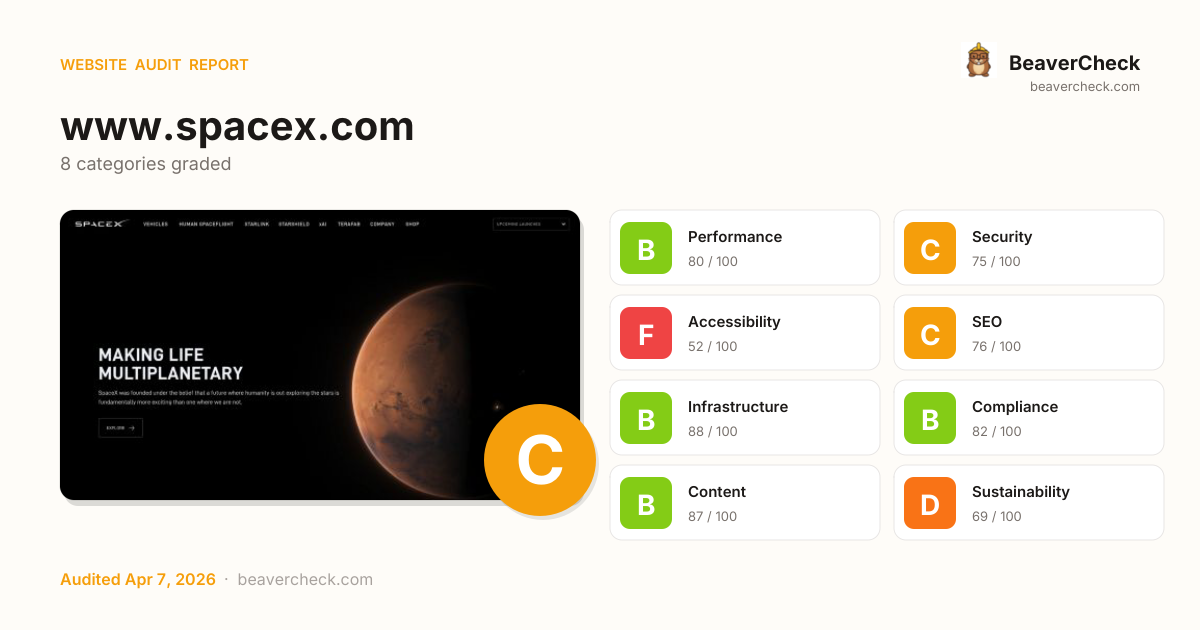
Audit overview
Accessibility and Sustainability need attention; the other categories are in good shape.
Fix Priority Matrix
5 findingsQuick Wins
3High impact, low effort — start here.
Strategic
2High impact, requires investment.
Easy Improvements
0Small gains, minimal effort.
Nothing in this quadrant — good news.
Deprioritize
0Low impact, high effort — do last.
Nothing in this quadrant — good news.
Screenshots


Your mail setup has problems.
spacex.com fails 1 mail check: No DMARC record found. This is the kind of misconfiguration that sends your mail to spam.
Top Priorities (5)
'unsafe-eval' found in script source
Unsafe value (unsafe-inline, unsafe-eval) in script-src defeats CSP's main protection — XSS injections can execute again.
'unsafe-inline' found in script source
Unsafe value (unsafe-inline, unsafe-eval) in script-src defeats CSP's main protection — XSS injections can execute again.
Page weighs 11.6 MB (10.7 MB transferred)
Informational: total page weight (uncompressed) and bytes actually transferred over the wire.
1 button(s) with no accessible text
Buttons with no accessible text (icon-only, no aria-label) can't be activated by voice control or understood by screen readers.
1 link(s) with no accessible text
Links with no accessible text (empty <a></a>, image-only no alt, icon-only no aria-label) are unidentifiable to screen readers.
Business case
What fixing the audit's findings is worth -- and what ignoring them keeps costing.
Return on investment
€1,105 investment → €8,561/month returns + EUR 20,500,000 risk avoided
Figures combine localized regulatory fine ceilings, search/conversion value priced against local CPC, and bandwidth waste estimates. Results depend on implementation quality and audience composition. Not legal or financial advice.
Conversion barriers
6 barrier(s) likely increasing bounce by ~26%.
- Page takes 4.6s to loadUsers abandon at ~3s — you're 2.1s over the 2.5s threshold→ Optimize render-blocking resources, preload the hero image, and compress images
- High main-thread blocking timePage is non-interactive for 279ms after first paint→ Defer third-party scripts and split large bundles
- No structured dataNo rich-result eligibility in Google — lower SERP CTR vs competitors with stars and prices→ Add JSON-LD for your page type (Product, Article, FAQPage, LocalBusiness, …)
- Thin contentUnder 300 words — visitors bounce looking for substance, search engines rank competitors first→ Add a substantive FAQ, product detail, or case-study section
- Content is hard to readGraduate-level reading difficulty — limits the addressable audience for product or blog pages→ Shorten sentences; replace jargon with plain language; target Flesch ease ≥60
Preliminary CRO audit — each barrier links to the tab with detailed analysis.
Remediation cost
Start here for the best return on investment
Cost by category
Cost by effort level
Adjust assumptions
Team composition
Multiplier applied to dev hours to reflect QA, design, and PM overhead. Use Dev only for solo work; Full team for projects with formal review processes.
Rates reflect fully-loaded developer cost including overhead
Warning:Cost of inaction
Compliance Risk
€20.500.000
- Privacy Policy not detectedGDPR: EUR 10.000 – EUR 20.000.000
- No <main> landmark foundEAA: EUR 1.000 – EUR 500.000
- 3 of 3 <nav> elements are unlabeledEAA: EUR 1.000 – EUR 500.000
Bounce-Rate Cost
€5.717 /mo
+26.0pp bounce · ~2,598 lost visitors/mo
CPC: EUR 2.20
Bandwidth Waste
€2,49 /mo
33666.4 MB/mo × 0.074 EUR/GB
- Optimize transfer: save ~3.4 MB per page loadSaves €2,49/mo
Compliance figures represent the statutory maximum fine for the most severe triggered category, capped per regulation — not the sum of per-finding penalties. Based on published regulatory fine ranges. This is not legal advice.
Unique monthly visitors from your analytics
Purchases, signups, or key actions
Optional — for revenue estimation
more engaged visitors from reduced bounce
Fix 5 critical issues to capture this value
How this is calculated
Based on Google/Deloitte research ("Milliseconds Make Millions") showing a ~7% bounce rate increase per additional second of LCP above the 2.5s "Good" threshold.
Your site's LCP: → estimated after fixes.
These are estimates based on industry research — actual results vary
Your data stays in your browser — nothing is sent to our servers
Lighthouse
Mobile
First Contentful Paint First Contentful Paint — how long until the browser renders the first piece of content. Under 1.8s is good.
2.11 s
Largest Contentful Paint Largest Contentful Paint — how long until the largest visible element loads. Under 2.5s is good.
4.61 s
Total Blocking Time Total Blocking Time — total time the main thread was blocked, preventing user input. Under 200ms is good.
279 ms
Cumulative Layout Shift Cumulative Layout Shift — measures visual stability. How much the page layout shifts during loading. Under 0.1 is good.
0.001
Speed Index Speed Index — how quickly content is visually displayed during load. Under 3.4s is good.
2.27 s
Time to Interactive Time to Interactive — how long until the page is fully interactive and responds to user input. Under 3.8s is good.
5.21 s
Desktop
First Contentful Paint First Contentful Paint — how long until the browser renders the first piece of content. Under 1.8s is good.
487 ms
Largest Contentful Paint Largest Contentful Paint — how long until the largest visible element loads. Under 2.5s is good.
1.36 s
Total Blocking Time Total Blocking Time — total time the main thread was blocked, preventing user input. Under 200ms is good.
594 ms
Cumulative Layout Shift Cumulative Layout Shift — measures visual stability. How much the page layout shifts during loading. Under 0.1 is good.
0.001
Speed Index Speed Index — how quickly content is visually displayed during load. Under 3.4s is good.
672 ms
Time to Interactive Time to Interactive — how long until the page is fully interactive and responds to user input. Under 3.8s is good.
1.36 s
Categories
8Performance
Page weighs 11.6 MB (10.7 MB transferred)
Security
'unsafe-eval' found in script source
Accessibility
1 button(s) with no accessible text
SEO
All checks pass
Infrastructure
All checks pass
Compliance
All checks pass
Content
All checks pass
Sustainability
All checks pass
How you compare
Where this site stands against peers running the same stack.
Technology stack
Angular 13.0.3, on TypeScript, with Cloudflare CDN
Stack Architecture
 Webpack
  Angular 13.0.3HSTS
  Lodash 4.17.21
 Open Graph Zone.js
  hCaptcha
  TypeScript
  Cloudflare
 All Detected Technologies (9)
Cloudflare is a web-infrastructure and website-security company, providing content-delivery-network services, DDoS mitigation, Internet security, and distributed domain-name-server services.
TypeScript is an open-source language which builds on JavaScript by adding static type definitions.
Angular is a TypeScript-based open-source web application framework led by the Angular Team at Google.
HTTP Strict Transport Security (HSTS) informs browsers that the site should only be accessed using HTTPS.
Lodash is a JavaScript library which provides utility functions for common programming tasks using the functional programming paradigm.
Open Graph is a protocol that is used to integrate any web page into the social graph.
hCaptcha is an anti-bot solution that protects user privacy and rewards websites.
Observations (2)
Angular version may be outdated
Detected Angular 13.0.3. The current major version is 17. Consider updating for security patches and new features.
Complex technology stack detected
9 technologies identified. A complex stack increases maintenance burden and attack surface. Consider whether all components are actively needed.
Show your score
Drop this badge on your README, marketing site, or status page. It auto-updates every time the audit re-runs and links back to this report.

This badge auto-updates with your latest scan result.
[](https://beavercheck.com/sites/spacex.com)<a href="https://beavercheck.com/sites/spacex.com"><img src="https://beavercheck.com/badge?url=https%3A%2F%2Fwww.spacex.com" alt="BeaverCheck Score"></a>https://beavercheck.com/badge?url=https%3A%2F%2Fwww.spacex.comExport & share
Download the audit, share with your team, or grab a fix plan ready to copy into your tracker.
Copies markdown to clipboard
Fix Plan
Three-week roadmap to ship the audit's findings, with one-click copy targets for your tracker.
Three-week fix plan
2 sprints · 13h total → projected B (86)
Sprint 1: Quick Wins
+6Highest ROI — low effort, high impact
- · Page weighs 11.6 MB (10.7 MB transferred)
- · 1 button(s) with no accessible text
- · 1 link(s) with no accessible text
Sprint 3: Strategic Improvements
+5Higher effort, long-term payoff
- · 'unsafe-eval' found in script source
- · 'unsafe-inline' found in script source