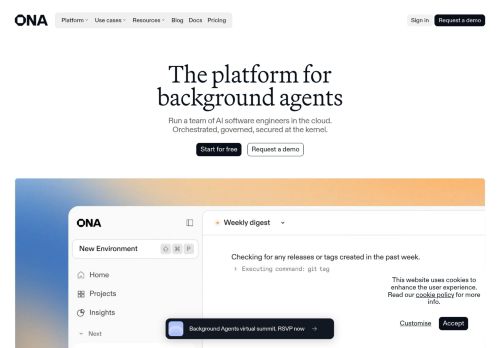
Mobile 375 × 812

Desktop 1440 × 900

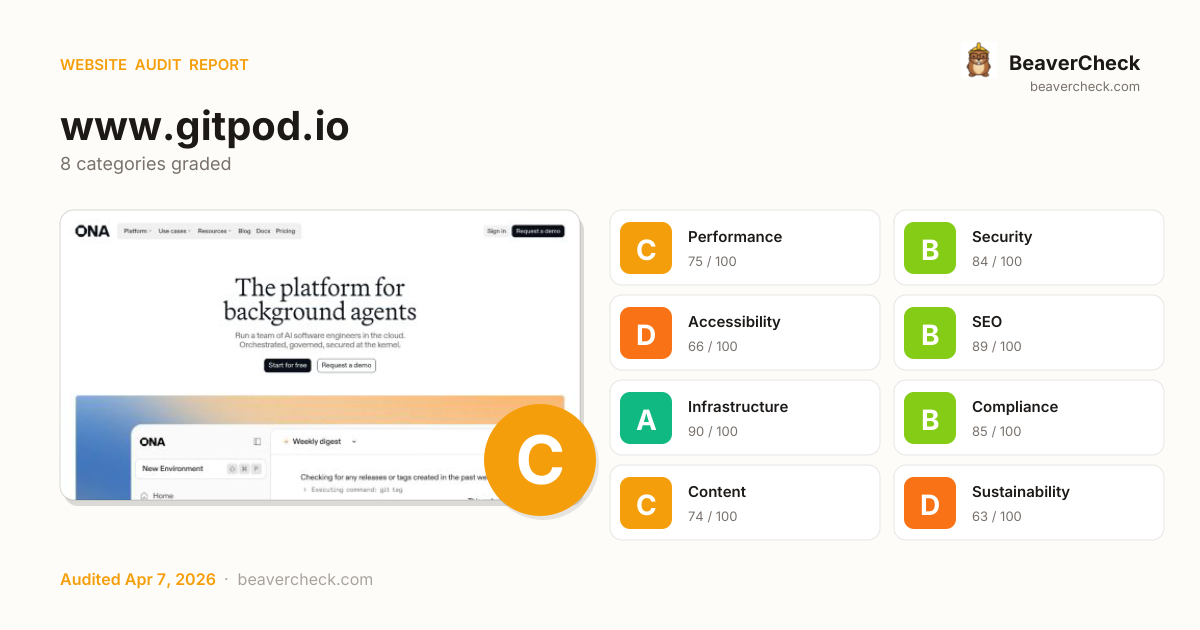
Score: 79 / 100
Based on 8 categories, 0 sections
The overall score is a weighted average of individual category scores. Categories with more impact on user experience and security carry more weight.
Weights reflect general web best practices. Individual needs may differ.
Page weighs 15.2 MB (13.0 MB transferred)
1 control(s) without accessible label
2 button(s) with no accessible text
No <main> landmark found
Cross-Origin-Embedder-Policy header is missing
[](https://beavercheck.com/results/d5dc4f05-56c7-c271-1c7b-aa2a403afe64)<a href="https://beavercheck.com/results/d5dc4f05-56c7-c271-1c7b-aa2a403afe64"><img src="https://beavercheck.com/badge?url=https%3A%2F%2Fwww.gitpod.io" alt="BeaverCheck Score"></a>https://beavercheck.com/badge?url=https%3A%2F%2Fwww.gitpod.ioThis badge auto-updates with your latest scan result.
Thanks for your feedback!
Industry-standard audits powered by Google Lighthouse.
Key metrics that affect user experience.
First Contentful Paint First Contentful Paint — how long until the browser renders the first piece of content. Under 1.8s is good.
2.08 s
Largest Contentful Paint Largest Contentful Paint — how long until the largest visible element loads. Under 2.5s is good.
11.04 s
Total Blocking Time Total Blocking Time — total time the main thread was blocked, preventing user input. Under 200ms is good.
1.06 s
Cumulative Layout Shift Cumulative Layout Shift — measures visual stability. How much the page layout shifts during loading. Under 0.1 is good.
0.000
Speed Index Speed Index — how quickly content is visually displayed during load. Under 3.4s is good.
3.12 s
Time to Interactive Time to Interactive — how long until the page is fully interactive and responds to user input. Under 3.8s is good.
11.29 s
Audit breakdown by category with detailed findings.
Remove large, duplicate JavaScript modules from bundles to reduce unnecessary bytes consumed by network activity.
Polyfills and transforms enable older browsers to use new JavaScript features. However, many aren't necessary for modern browsers. Consider modifying your JavaScript build process to not transpile Baseline features, unless you know you must support older browsers. Learn why most sites can deploy ES6+ code without transpiling
3rd party code can significantly impact load performance. Reduce and defer loading of 3rd party code to prioritize your page's content.
Your first network request is the most important. Reduce its latency by avoiding redirects, ensuring a fast server response, and enabling text compression.
Consider setting font-display to swap or optional to ensure text is consistently visible. swap can be further optimized to mitigate layout shifts with font metric overrides.
| URL | Est Savings |
|---|---|
| ona.com/fonts/ABCDiatype-Bold.woff2 | 55 ms |
Optimize LCP by making the LCP image discoverable from the HTML immediately, and avoiding lazy-loading
Avoid chaining critical requests by reducing the length of chains, reducing the download size of resources, or deferring the download of unnecessary resources to improve page load.
Requests are blocking the page's initial render, which may delay LCP. Deferring or inlining can move these network requests out of the critical path.
| URL | Transfer Size | Duration |
|---|---|---|
| /_next/static/css/9ceaaebb25e2f4e8.css?dpl=dpl_ANCmi9Rr7d... | 23.0 KiB | 301 ms |
| /_next/static/css/26822e0a58fba0c7.css?dpl=dpl_ANCmi9Rr7d... | 4.0 KiB |
A long cache lifetime can speed up repeat visits to your page. Learn more about caching.
| Request | Cache TTL | Transfer Size |
|---|---|---|
| snap.licdn.com/li.lms-analytics/insight.min.js | 86400.0 s | 18.7 KiB |
| /collect?v=2&fmt=js&pid=5631476&time=1775593699372&url=ht... | 0.0 ms | 910 B |
Reducing the download time of images can improve the perceived load time of the page and LCP. Learn more about optimizing image size
| URL | Resource Size | Est Savings | |
|---|---|---|---|
div.floating-announcement_pill__sYal_ > a.floating-announcement_pillLink__ZJHXu > span.floating-announcement_iconWrap__lhEGv > img.floating-announcement_iconImage__D3kX5 div.floating-announcement_pill__sYal_ > a.floating-announcement_pillLink__ZJHXu > span.floating-announcement_iconWrap__lhEGv > img.floating-announcement_iconImage__D3kX5 | ona.com/images/banner-generic-image.webp | 8.8 KiB | 8.7 KiB |
These insights are also available in the Chrome DevTools Performance Panel - record a trace to view more detailed information.
The maximum potential First Input Delay that your users could experience is the duration of the longest task. Learn more about the Maximum Potential First Input Delay metric.
Redirects introduce additional delays before the page can be loaded. Learn how to avoid page redirects.
| URL | Time Spent |
|---|---|
| www.gitpod.io/ | 847 ms |
| ona.com/ | 0.0 ms |
Time to Interactive is the amount of time it takes for the page to become fully interactive. Learn more about the Time to Interactive metric.
Reduce unused JavaScript and defer loading scripts until they are required to decrease bytes consumed by network activity. Learn how to reduce unused JavaScript.
| URL | Transfer Size | Est Savings |
|---|---|---|
| /_next/static/chunks/a4634e51-1edca49e0237387d.js?dpl=dpl... | 154.1 KiB | 92.8 KiB |
| www.googletagmanager.com/gtm.js?id=GTM-P4LP64V | 157.4 KiB | 70.3 KiB |
| www.googletagmanager.com/gtag/js?id=G-N7BXGH25CC | 172.4 KiB | 68.0 KiB |
| /_next/static/chunks/9394-1ed5100686ed099a.js?dpl=dpl_ANC... | 39.5 KiB | 21.2 KiB |
Consider reducing the time spent parsing, compiling, and executing JS. You may find delivering smaller JS payloads helps with this. Learn how to reduce Javascript execution time.
| URL | Total CPU Time | Script Evaluation | Script Parse |
|---|---|---|---|
| /_next/static/chunks/8497-9eef2f9e09183f7c.js?dpl=dpl_ANC... | 938 ms | 857 ms | 56 ms |
| Unattributable | 668 ms | 29 ms | 0.0 ms |
| /_next/static/chunks/1684-920f26c8bc9686e9.js?dpl=dpl_ANC... | 624 ms | 489 ms | 32 ms |
| ona.com/ | 537 ms | 13 ms | 11 ms |
| /_next/static/chunks/a4634e51-1edca49e0237387d.js?dpl=dpl... | 398 ms | 222 ms | 42 ms |
| /_next/static/chunks/8787-2a15ff454cd553a8.js?dpl=dpl_ANC... | 273 ms | 92 ms | 1.9 ms |
| www.googletagmanager.com/gtm.js?id=GTM-P4LP64V | 256 ms | 211 ms | 38 ms |
| /_next/static/chunks/4bd1b696-18463eebcae08e3d.js?dpl=dpl... | 230 ms | 155 ms | 15 ms |
| www.googletagmanager.com/gtag/js?id=G-N7BXGH25CC | 211 ms | 161 ms | 48 ms |
| /_next/static/chunks/9394-1ed5100686ed099a.js?dpl=dpl_ANC... | 142 ms | 84 ms | 9.4 ms |
| /_next/static/chunks/5820.7164c20ffb7233ec.js?dpl=dpl_ANC... | 128 ms | 120 ms | 6.9 ms |
Consider reducing the time spent parsing, compiling and executing JS. You may find delivering smaller JS payloads helps with this. Learn how to minimize main-thread work
| Category | Time Spent |
|---|---|
| Script Evaluation | 2.5 s |
| Other | 1.1 s |
| Style & Layout | 358 ms |
| Script Parsing & Compilation | 313 ms |
| Rendering | 155 ms |
| Garbage Collection | 60 ms |
| Parse HTML & CSS | 50 ms |
Large network payloads cost users real money and are highly correlated with long load times. Learn how to reduce payload sizes.
More information about the performance of your application. These numbers don't directly affect the Performance score.
These checks highlight opportunities to improve the accessibility of your web app. Automatic detection can only detect a subset of issues and does not guarantee the accessibility of your web app, so manual testing is also encouraged.
Low-contrast text is difficult or impossible for many users to read. Learn how to provide sufficient color contrast.
| Failing Elements |
|---|
Top 100 global company div.overflow-y-clip > section.container > div.bg-grey-450 > p.text-body-160 |
productivity increase section.container > div.grid > div.bg-grey-400 > p.text-body-110 |
of PRs co-authored by Ona section.container > div.grid > div.bg-grey-400 > p.text-body-110 |
Python repos modernized in 6 months section.container > div.grid > div.bg-grey-400 > p.text-body-110 |
Compliant, certified, and trusted by Fortune 500 companies. section.container > div.flex > h2.text-[1.125rem] > span.text-grey-700 |
The adversary can reason now, and our security tools weren't built for that. section.container > div.flex > a.flex > p.text-body-160 |
Background agents that write, test, and ship code on a schedule. Ona Automation… section.container > div.flex > a.flex > p.text-body-160 |
The companies winning with background agents didn't start with better models. T… section.container > div.flex > a.flex > p.text-body-160 |
These are opportunities to improve the legibility of your content.
Labels ensure that form controls are announced properly by assistive technologies, like screen readers. Learn more about form element labels.
| Failing Elements |
|---|
div.flex > div.flex > div.w-full > input.cursor-pointer div.flex > div.flex > div.w-full > input.cursor-pointer |
These are opportunities to improve the semantics of the controls in your application. This may enhance the experience for users of assistive technology, like a screen reader.
Touch targets with sufficient size and spacing help users who may have difficulty targeting small controls to activate the targets. Learn more about touch targets.
| Failing Elements |
|---|
1x div.text-white > div.flex > div.flex > button.flex |
Unmute div.text-white > div.flex > div.flex > button.flex |
Fullscreen div.text-white > div.flex > div.flex > button.flex |
Automations div.col-span-1 > ul.text-[0.75rem] > li.flex > a.leading-[1] |
Environments div.col-span-1 > ul.text-[0.75rem] > li.flex > a.leading-[1] |
Governance div.col-span-1 > ul.text-[0.75rem] > li.flex > a.leading-[1] |
Pricing div.col-span-1 > ul.text-[0.75rem] > li.flex > a.leading-[1] |
AI code review div.col-span-1 > ul.text-[0.75rem] > li.flex > a.leading-[1] |
Code migration div.col-span-1 > ul.text-[0.75rem] > li.flex > a.leading-[1] |
CVE remediation div.col-span-1 > ul.text-[0.75rem] > li.flex > a.leading-[1] |
Standardization div.col-span-1 > ul.text-[0.75rem] > li.flex > a.leading-[1] |
Devin div.col-span-1 > ul.text-[0.75rem] > li.flex > a.leading-[1] |
Codex div.col-span-1 > ul.text-[0.75rem] > li.flex > a.leading-[1] |
Factory div.col-span-1 > ul.text-[0.75rem] > li.flex > a.leading-[1] |
Blog div.col-span-1 > ul.text-[0.75rem] > li.flex > a.leading-[1] |
Docs div.col-span-1 > ul.text-[0.75rem] > li.flex > a.leading-[1] |
Changelog div.col-span-1 > ul.text-[0.75rem] > li.flex > a.leading-[1] |
Events div.col-span-1 > ul.text-[0.75rem] > li.flex > a.leading-[1] |
Newsletter div.col-span-1 > ul.text-[0.75rem] > li.flex > a.leading-[1] |
Templates div.col-span-1 > ul.text-[0.75rem] > li.flex > a.leading-[1] |
Videos div.col-span-1 > ul.text-[0.75rem] > li.flex > a.leading-[1] |
Reports div.col-span-1 > ul.text-[0.75rem] > li.flex > a.leading-[1] |
About div.col-span-1 > ul.text-[0.75rem] > li.flex > a.leading-[1] |
Careers div.col-span-1 > ul.text-[0.75rem] > li.flex > a.leading-[1] |
Media div.col-span-1 > ul.text-[0.75rem] > li.flex > a.leading-[1] |
Contact div.col-span-1 > ul.text-[0.75rem] > li.flex > a.leading-[1] |
Status div.col-span-3 > ul.text-[0.75rem] > li.flex > a.leading-[1] |
Security div.col-span-3 > ul.text-[0.75rem] > li.flex > a.leading-[1] |
Imprint div.col-span-3 > ul.text-[0.75rem] > li.flex > a.leading-[1] |
Terms of service div.col-span-3 > ul.text-[0.75rem] > li.flex > a.leading-[1] |
Terms of use div.col-span-3 > ul.text-[0.75rem] > li.flex > a.leading-[1] |
Privacy policy div.col-span-3 > ul.text-[0.75rem] > li.flex > a.leading-[1] |
Cookie policy div.col-span-3 > ul.text-[0.75rem] > li.flex > a.leading-[1] |
One main landmark helps screen reader users navigate a web page. Learn more about landmarks.
| Failing Elements |
|---|
html.light html.light |
These items highlight common accessibility best practices.
Deprecated APIs will eventually be removed from the browser. Learn more about deprecated APIs.
| Deprecation / Warning | Source |
|---|---|
| AttributionReporting |
Source maps translate minified code to the original source code. This helps developers debug in production. In addition, Lighthouse is able to provide further insights. Consider deploying source maps to take advantage of these benefits. Learn more about source maps.
These checks ensure that your page is following basic search engine optimization advice. There are many additional factors Lighthouse does not score here that may affect your search ranking, including performance on Core Web Vitals. Learn more about Google Search Essentials.
Industry-standard audits powered by Google Lighthouse. — Desktop
Key metrics that affect user experience. — Desktop
First Contentful Paint First Contentful Paint — how long until the browser renders the first piece of content. Under 1.8s is good.
701 ms
Largest Contentful Paint Largest Contentful Paint — how long until the largest visible element loads. Under 2.5s is good.
2.24 s
Total Blocking Time Total Blocking Time — total time the main thread was blocked, preventing user input. Under 200ms is good.
68 ms
Cumulative Layout Shift Cumulative Layout Shift — measures visual stability. How much the page layout shifts during loading. Under 0.1 is good.
0.000
Speed Index Speed Index — how quickly content is visually displayed during load. Under 3.4s is good.
1.38 s
Time to Interactive Time to Interactive — how long until the page is fully interactive and responds to user input. Under 3.8s is good.
2.31 s
Audit breakdown by category with detailed findings.
Remove large, duplicate JavaScript modules from bundles to reduce unnecessary bytes consumed by network activity.
Polyfills and transforms enable older browsers to use new JavaScript features. However, many aren't necessary for modern browsers. Consider modifying your JavaScript build process to not transpile Baseline features, unless you know you must support older browsers. Learn why most sites can deploy ES6+ code without transpiling
3rd party code can significantly impact load performance. Reduce and defer loading of 3rd party code to prioritize your page's content.
Your first network request is the most important. Reduce its latency by avoiding redirects, ensuring a fast server response, and enabling text compression.
Consider setting font-display to swap or optional to ensure text is consistently visible. swap can be further optimized to mitigate layout shifts with font metric overrides.
| URL | Est Savings |
|---|---|
| ona.com/fonts/ABCDiatype-Bold.woff2 | 50 ms |
Optimize LCP by making the LCP image discoverable from the HTML immediately, and avoiding lazy-loading
Avoid chaining critical requests by reducing the length of chains, reducing the download size of resources, or deferring the download of unnecessary resources to improve page load.
A long cache lifetime can speed up repeat visits to your page. Learn more about caching.
| Request | Cache TTL | Transfer Size |
|---|---|---|
| snap.licdn.com/li.lms-analytics/insight.min.js | 86400.0 s | 18.7 KiB |
| /collect?v=2&fmt=js&pid=5631476&time=1775593716455&url=ht... | 0.0 ms | 691 B |
Reducing the download time of images can improve the perceived load time of the page and LCP. Learn more about optimizing image size
| URL | Resource Size | Est Savings | |
|---|---|---|---|
div.floating-announcement_pill__sYal_ > a.floating-announcement_pillLink__ZJHXu > span.floating-announcement_iconWrap__lhEGv > img.floating-announcement_iconImage__D3kX5 div.floating-announcement_pill__sYal_ > a.floating-announcement_pillLink__ZJHXu > span.floating-announcement_iconWrap__lhEGv > img.floating-announcement_iconImage__D3kX5 | ona.com/images/banner-generic-image.webp | 8.8 KiB | 8.8 KiB |
Requests are blocking the page's initial render, which may delay LCP. Deferring or inlining can move these network requests out of the critical path.
| URL | Transfer Size |
|---|---|
| /_next/static/css/9ceaaebb25e2f4e8.css?dpl=dpl_ANCmi9Rr7d... | 22.9 KiB |
| /_next/static/css/26822e0a58fba0c7.css?dpl=dpl_ANCmi9Rr7d... | 4.1 KiB |
These insights are also available in the Chrome DevTools Performance Panel - record a trace to view more detailed information.
Redirects introduce additional delays before the page can be loaded. Learn how to avoid page redirects.
| URL | Time Spent |
|---|---|
| www.gitpod.io/ | 309 ms |
| ona.com/ | 0.0 ms |
The maximum potential First Input Delay that your users could experience is the duration of the longest task. Learn more about the Maximum Potential First Input Delay metric.
Reduce unused JavaScript and defer loading scripts until they are required to decrease bytes consumed by network activity. Learn how to reduce unused JavaScript.
| URL | Transfer Size | Est Savings |
|---|---|---|
| /_next/static/chunks/a4634e51-1edca49e0237387d.js?dpl=dpl... | 154.1 KiB | 92.2 KiB |
| www.googletagmanager.com/gtm.js?id=GTM-P4LP64V | 157.4 KiB | 70.3 KiB |
| www.googletagmanager.com/gtag/js?id=G-N7BXGH25CC | 172.4 KiB | 67.6 KiB |
| /_next/static/chunks/9394-1ed5100686ed099a.js?dpl=dpl_ANC... | 39.5 KiB | 21.2 KiB |
Large network payloads cost users real money and are highly correlated with long load times. Learn how to reduce payload sizes.
More information about the performance of your application. These numbers don't directly affect the Performance score.
These checks highlight opportunities to improve the accessibility of your web app. Automatic detection can only detect a subset of issues and does not guarantee the accessibility of your web app, so manual testing is also encouraged.
When a button doesn't have an accessible name, screen readers announce it as "button", making it unusable for users who rely on screen readers. Learn how to make buttons more accessible.
| Failing Elements |
|---|
figure.relative > figure.w-full > div.w-full > button.absolute figure.relative > figure.w-full > div.w-full > button.absolute |
Labels ensure that form controls are announced properly by assistive technologies, like screen readers. Learn more about form element labels.
| Failing Elements |
|---|
div.flex > div.flex > div.w-full > input.cursor-pointer div.flex > div.flex > div.w-full > input.cursor-pointer |
These are opportunities to improve the semantics of the controls in your application. This may enhance the experience for users of assistive technology, like a screen reader.
Low-contrast text is difficult or impossible for many users to read. Learn how to provide sufficient color contrast.
| Failing Elements |
|---|
Top 100 global company div.overflow-y-clip > section.container > div.bg-grey-450 > p.text-body-160 |
productivity increase section.container > div.grid > div.bg-grey-400 > p.text-body-110 |
of PRs co-authored by Ona section.container > div.grid > div.bg-grey-400 > p.text-body-110 |
Python repos modernized in 6 months section.container > div.grid > div.bg-grey-400 > p.text-body-110 |
Compliant, certified, and trusted by Fortune 500 companies. section.container > div.flex > h2.text-[1.125rem] > span.text-grey-700 |
The adversary can reason now, and our security tools weren't built for that. section.container > div.flex > a.flex > p.text-body-160 |
Background agents that write, test, and ship code on a schedule. Ona Automation… section.container > div.flex > a.flex > p.text-body-160 |
The companies winning with background agents didn't start with better models. T… section.container > div.flex > a.flex > p.text-body-160 |
These are opportunities to improve the legibility of your content.
One main landmark helps screen reader users navigate a web page. Learn more about landmarks.
| Failing Elements |
|---|
html.light html.light |
These items highlight common accessibility best practices.
Deprecated APIs will eventually be removed from the browser. Learn more about deprecated APIs.
| Deprecation / Warning | Source |
|---|---|
| AttributionReporting |
Errors logged to the console indicate unresolved problems. They can come from network request failures and other browser concerns. Learn more about this errors in console diagnostic audit
| Source | Description |
|---|---|
Failed to load resource: the server responded with a status of 404 () |
Source maps translate minified code to the original source code. This helps developers debug in production. In addition, Lighthouse is able to provide further insights. Consider deploying source maps to take advantage of these benefits. Learn more about source maps.
These checks ensure that your page is following basic search engine optimization advice. There are many additional factors Lighthouse does not score here that may affect your search ranking, including performance on Core Web Vitals. Learn more about Google Search Essentials.
Send Feedback