

Content
· 9 checks — Internal links, mixed-content guards, Open Graph previews, and structured data rolled into one auditable list.FImage OptimizationAction4 issues found across 22 imagesFIX
CBrand PresenceActionSite-name consistency, favicon, social image, meta tags, schema, and contact signalsREVIEW
Brand Presence
Your brand name differs across channels — visitors see inconsistent identity.
C
67/100
Site name appears as
| Page title | Split Scanned Photos & Auto-Crop Album Scans Online | |
| og:site_name | AI Auto Cropper | |
| twitter:site | https://aiautocropper.tian-wei.workers.dev | |
| Organization.name | — |
Inconsistent — names differ across channels
Brand assets
Favicon
12/15covers apple-touch-icon
Social share image
20/20og:image + twitter:image set
Meta completeness
20/20Organization schema
0/15Contact info discoverable
10/10contact page + mailto link
Findings
- Brand name differs across channels — users see inconsistent identity
- Add an apple-touch-icon and at least two PNG sizes (32x32 + 192x192)
- No Organization schema — Google can't render your logo in the knowledge panel
How consistently your brand appears across channels — shared link previews, structured data, favicon, contact info.
A+Links67 links checked, 67 healthy, 0 brokenPASS
A+Mixed ContentNo mixed content detected — all resources use HTTPS.PASS
A+Open GraphOpen Graph tags are well configured for social sharing.PASS
69 charsTitles over 60 characters may be truncated in social sharing previews.
25–60 charsog:title borderline-too-long — Facebook/LinkedIn may truncate. Aim for ~60-70 characters max.
Source: Open Graph Protocol
Preview
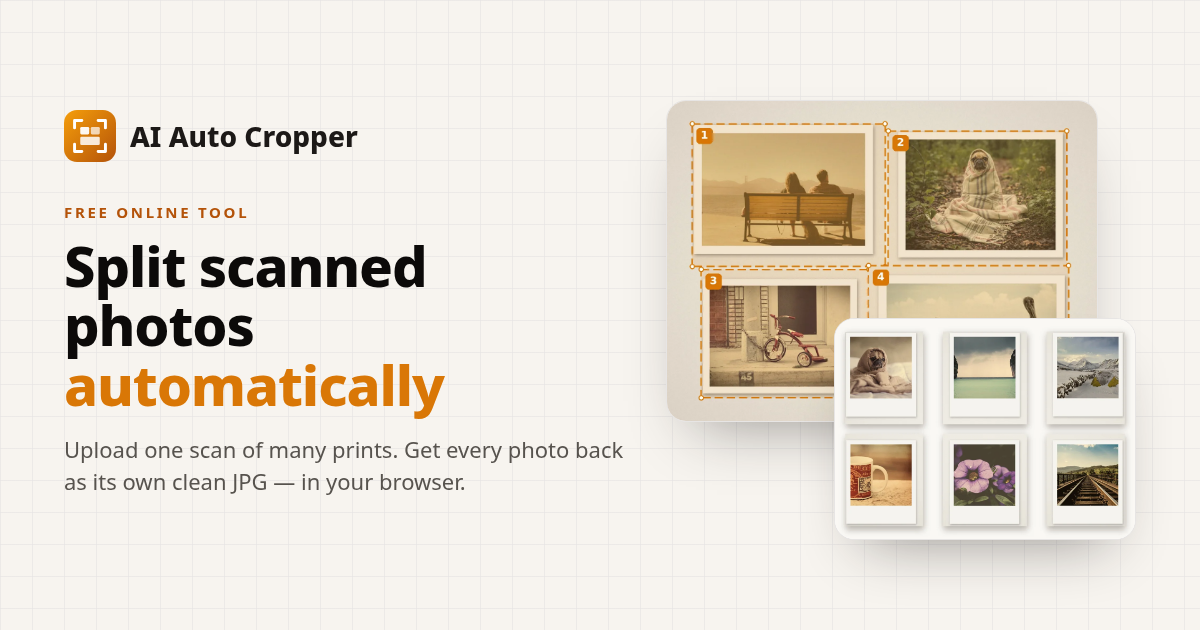
aiautocropper.com
AI Auto Cropper — Split Scanned Photos & Auto-Crop Album Scans Online
Upload an album page or a flatbed scan with several prints. AI Auto Cropper finds every photo, crops each one, and exports separate JPGs or a ZIP — free, in your browser.
Title will be truncated (71 chars / 70 max)
- twitter:card — summary_large_image
- twitter:title — AI Auto Cropper — Split Scanned Photos & Auto-Crop Album Scans Online
- twitter:description — Upload an album page or a flatbed scan with several prints. AI Auto Cropper finds every photo, crops each one, and ex...
- twitter:image — https://aiautocropper.tian-wei.workers.dev/og.png
Title will be truncated on Twitter/X (71 chars, max 70)
→ Shorten the title to ≤70 characters
AIAUTOCROPPER.COM
AI Auto Cropper — Split Scanned Photos & Auto-Crop Album Scans Online
Upload an album page or a flatbed scan with several prints. AI Auto Cropper finds every photo, crops each one, and exports separate JPGs or a ZIP — free, in your browser.
Title will be truncated (71 chars / 60 max)
Description will be truncated (172 chars / 155 max)
- og:title — AI Auto Cropper — Split Scanned Photos & Auto-Crop Album Scans Online
- og:description — Upload an album page or a flatbed scan with several prints. AI Auto Cropper finds every photo, crops each one, and ex...
- og:image — https://aiautocropper.tian-wei.workers.dev/og.png
- og:type — website
- og:url — https://aiautocropper.tian-wei.workers.dev
- og:site_name — AI Auto Cropper
Title will be truncated on Facebook (71 chars, max 60)
→ Shorten og:title to ≤60 characters
Description will be truncated on Facebook (172 chars, max 155)
→ Tighten og:description to ≤155 characters
AI Auto Cropper — Split Scanned Photos & Auto-Crop Album Scans Online
aiautocropper.com
Description will be truncated (172 chars / 150 max)
- og:title — AI Auto Cropper — Split Scanned Photos & Auto-Crop Album Scans Online
- og:description — Upload an album page or a flatbed scan with several prints. AI Auto Cropper finds every photo, crops each one, and ex...
- og:image — https://aiautocropper.tian-wei.workers.dev/og.png
Description will be truncated on LinkedIn (172 chars, max 150)
→ Tighten og:description to ≤150 characters
aiautocropper.com
AI Auto Cropper — Split Scanned Photos & Auto-Crop Album Scans Online
Upload an album page or a flatbed scan with several prints. AI Auto Cropper finds every photo, crops each one, and exports separate JPGs or a ZIP — free, in your browser.
- og:title — AI Auto Cropper — Split Scanned Photos & Auto-Crop Album Scans Online
- og:description — Upload an album page or a flatbed scan with several prints. AI Auto Cropper finds every photo, crops each one, and ex...
- og:image — https://aiautocropper.tian-wei.workers.dev/og.png
Social preview quality
Averaged across Twitter/X, Facebook, LinkedIn, and Slack.
| Field | Twitter/X | Slack | ||
|---|---|---|---|---|
| og:title | ||||
| og:description | ||||
| og:image | ||||
| og:type | ||||
| og:url | ||||
| og:site_name | ||||
| twitter:card | — | — | — | |
| twitter:title | — | — | — | |
| twitter:description | — | — | — | |
| twitter:image | — | — | — |
A+Open Graph / Twitter Card DepthOG image dimensions and Twitter card configuration look healthyPASS
A+Structured Data3 JSON-LD block(s) found — structured data is well configured.PASS
JSON-LD Blocks
{
  "@context": "https://schema.org",
  "@type": "WebApplication",
  "name": "AI Auto Cropper",
  "description": "Upload an album page or a flatbed scan with several prints. AI Auto Cropper finds every photo, crops each one, and exports separate JPGs or a ZIP — free, in your browser.",
  "url": "https://aiautocropper.tian-wei.workers.dev",
  "applicationCategory": "MultimediaApplication",
  "operatingSystem": "Web Browser",
  "offers": {
    "@type": "Offer",
    "price": "0",
    "priceCurrency": "USD",
    "description": "Free during preview; paid plans planned, not open yet"
  },
  "featureList": [
    "Automatic photo detection on album and multi-photo scans",
    "Split scanned photos into separate files",
    "Adjustable crop boxes (move, resize, add, remove)",
    "Export individual JPGs or a ZIP at original resolution",
    "In-browser processing with no upload"
  ]
}{
"@context": "https://schema.org",
"@type": "FAQPage",
"mainEntity": [
{
"@type": "Question",
"name": "How do I split a scan with several photos into separate files?",
"acceptedAnswer": {
"@type": "Answer",
"text": "Drop the scan (or many scans) into the tool at the top of this page. Every print is detected and outlined; check the boxes, then click Export — one photo downloads directly, two or more arrive in one ZIP."
}
},
{
"@type": "Question",
"name": "Is AI Auto Cropper free?",
"acceptedAnswer": {
"@type": "Answer",
"text": "Yes. During the preview every feature is free — no account, no watermark, no page limit, and ZIP export included. Paid plans are planned for later and are clearly marked as not open yet on the pricing page."
}
},
{
"@type": "Question",
"name": "Are my scans uploaded anywhere?",
"acceptedAnswer": {
"@type": "Answer",
"text": "No. Detection and cropping run in your browser, on your device. Your images are not sent to our server."
}
},
{
"@type": "Question",
"name": "Does it work with a single photo?",
"acceptedAnswer": {
"@type": "Answer",
"text": "Yes. If the scan holds one print on a plain scanner background, the empty border is trimmed. If no separate print is found — for example a normal phone photo of your dog — an in-browser AI model looks for the main subject (people, pets, common objects) and proposes a crop around it, tilted when the subject lies at an angle. If there is no clear subject, the whole image is kept."
}
},
{
"@type": "Question",
"name": "Will it straighten photos that are tilted on the scanner?",
"acceptedAnswer": {
"@type": "Answer",
"text": "Yes. Each print gets a rotated box that follows its edges, and the export is straightened to match. Tilts under 2° are treated as level by default (Advanced options → Ignore minor rotations). It does not detect sideways or upside-down photos — use Rotate left/right on a crop for those."
}
},
{
"@type": "Question",
"name": "What scans give the best detection?",
"acceptedAnswer": {
"@type": "Answer",
"text": "A plain, even background (the scanner lid or an album page), a small gap between prints, and flat prints without heavy shadows. 300–600 DPI scans give sharp, printable crops."
}
},
{
"@type": "Question",
"name": "What file formats can I upload and download?",
"acceptedAnswer": {
"@type": "Answer",
"text": "Upload JPG, PNG, WebP, HEIC/HEIF (iPhone), TIFF (first page, 8- or 16-bit) or PDF (each page becomes a scan). Export JPG, JPEG or PNG at a quality you choose, optionally padded to a fixed aspect ratio and with a date taken written to the JPG."
}
},
{
"@type": "Question",
"name": "What if a photo is missed or cropped wrong?",
"acceptedAnswer": {
"@type": "Answer",
"text": "Drag a box to move it, pull a corner or edge to resize, use the round handle to rotate, draw a new box on empty space (or Add crop on mobile), and press Delete for one you don’t need. Ctrl/⌘+Z undoes any change."
}
}
]
}{
"@context": "https://schema.org",
"@type": "HowTo",
"name": "How It Works",
"description": "Four steps to split a scanned page into individual photos.",
"step": [
{
"@type": "HowToStep",
"position": 1,
"name": "Upload",
"text": "Drop one or many scans — JPG, PNG, WebP, HEIC, TIFF or PDF (every PDF page becomes a scan)."
},
{
"@type": "HowToStep",
"position": 2,
"name": "Detect",
"text": "Every print is outlined automatically — including its tilt — right in your browser."
},
{
"@type": "HowToStep",
"position": 3,
"name": "Adjust (optional)",
"text": "Move, resize or rotate a box, draw a missing one, undo, or copy a layout to every scan."
},
{
"@type": "HowToStep",
"position": 4,
"name": "Download",
"text": "Export straightened, full-resolution JPG or PNG files — one photo directly, many as a ZIP."
}
]
}